
Picking a logging framework for your new .NET project? I've tried all the best known ones, including log4net, NLog and Microsoft's Logging Application Block. All of these logging frameworks basically output plain text but recently I tried Serilog and was literally blown away by what you could do with it.
Logging in JSON Format
Take a look at the code below which makes use of the Serilog logger to log a geo-coordinate and an integer:
var position = new { Latitude = 25, Longitude = 134 };
var elapsedMs = 34;

log.Information("Processed {@Position} in {Elapsed:000} ms.", position, elapsedMs);
If you configure Serilog correctly, you can get it to output it's logs to JSON format, so the above line would log the following:
{
  "Timestamp": "2015-12-07T12:26:24.0557671+00:00",
  "Level": "Information",
  "MessageTemplate": "Processed {@Position} in {Elapsed:000} ms.",
  "RenderedMessage": "Processed { Latitude: 25, Longitude: 134 } in 034 ms.",
  "Properties": {
    "Position":
    {
        "Latitude": 25,
        "Longitude": 134
    },
    "Elapsed": 34,
    "ProcessId": 123,
    "ThreadId": 123,
    "User": "Domain\\Username",
    "Machine": "Machine-Name",
    "Source": "My Application Name"
  }
}
Why JSON?
What can you do with JSON formatted logs that you can't do with plain text? Well, if you store all your logs in something like Elastic Search, you can query your logs and ask it questions. So if we take the above example further we could find all log messages from a particular machine or user with an elapsed time of more than 10 milliseconds and a distance of 10 Km away from the specific location.
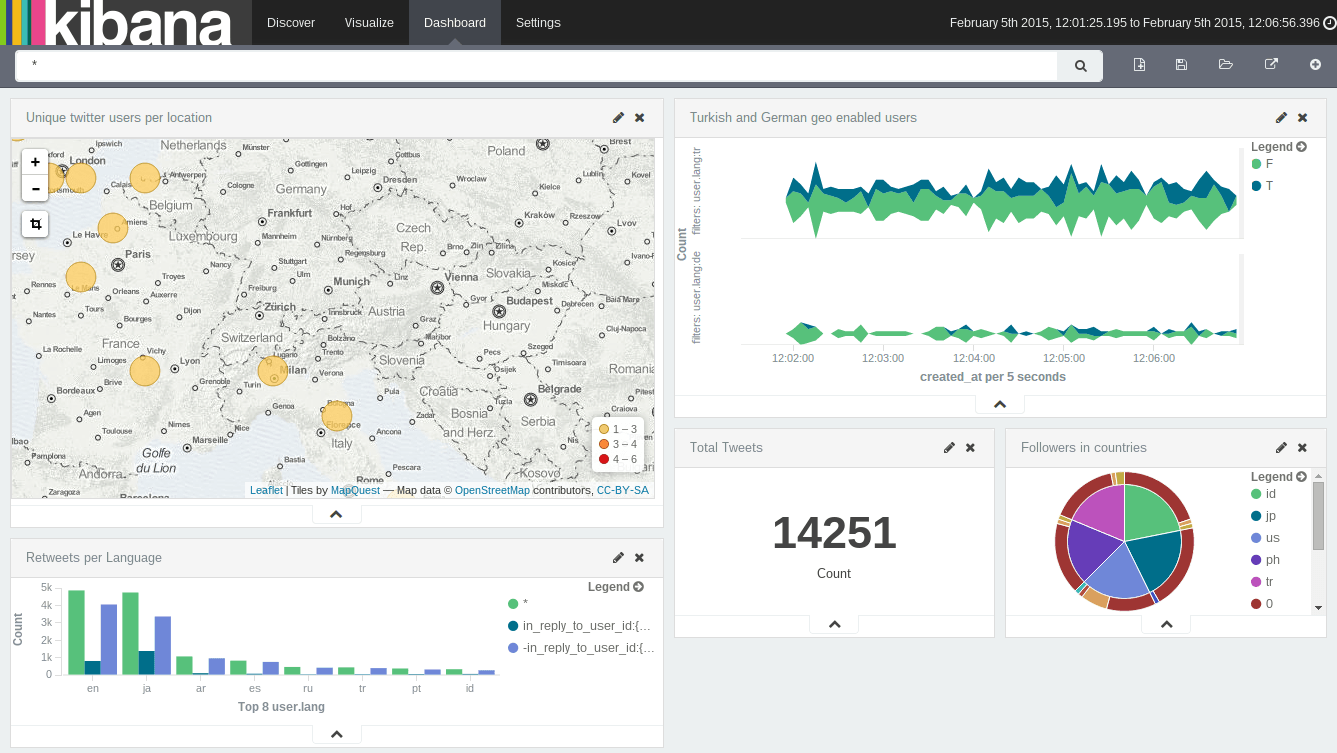
Not only that but if you set up something like Kibana, then you can create visualisations for your logs which could grow to be gigabytes in size over time. You can create dashboards with cool charts and maps that look something like this:
Logging Exceptions
One major problem with all exceptions is that they do not log all the properties of an exception and throw away vital information. Take the DbEntityValidationException from EntityFramework as an example. This exception contains vital information buried not in the message but in a custom property called EntityValidationErrors. The problem is that when you do an exception.ToString() call, this vital information is not included in the resulting string. Even worse, it's not included in the debugger either. This is a pretty major failing in the .NET framework but alas we have to work around it.
There are literally dozens of questions on Stack Overflow asking how to deal with this problem and all the major logging frameworks fail in this regard. All of them call exception.ToString() and fail to log the EntityValidationErrors collection.
DbEntityValidationException is not the only culprit, half the exceptions in the .NET framework contain custom properties that are not logged. The Exception base class itself has a Data dictionary collection which is never logged either.
Serilog.Exceptions
I wrote Serilog.Exceptions to solve this problem. So what happens when you log a DbEntityValidationException using this NuGet package added to Serilog itself? Well take a look yourself:
{
  "Timestamp": "2015-12-07T12:26:24.0557671+00:00",
  "Level": "Error",
  "MessageTemplate": "Hello World",
  "RenderedMessage": "Hello World",
  "Exception": "System.Data.Entity.Validation.DbEntityValidationException: Message",
  "Properties": {
    "ExceptionDetail": {
      "EntityValidationErrors": [
        {
          "Entry": null,
          "ValidationErrors": [
            {
              "PropertyName": "PropertyName",
              "ErrorMessage": "PropertyName is Required.",
              "Type": "System.Data.Entity.Validation.DbValidationError"
            }
          ],
          "IsValid": false,
          "Type": "System.Data.Entity.Validation.DbEntityValidationResult"
        }
      ],
      "Message": "Validation failed for one or more entities. See 'EntityValidationErrors' property for more details.",
      "Data": {},
      "InnerException": null,
      "TargetSite": null,
      "StackTrace": null,
      "HelpLink": null,
      "Source": null,
      "HResult": -2146232032,
      "Type": "System.Data.Entity.Validation.DbEntityValidationException"
    },
    "ProcessId": 123,
    "ThreadId": 123,
    "User": "Domain\\Username",
    "Machine": "Machine-Name",
    "Source": "My Application Name"
  }
}
It logs every single property of the exception and not only that but it drills down even further into the object hierarchy and logs that information too.
You're probably thinking it uses reflection right? Well...sometimes. This library has custom code to deal with extra properties on most common exception types and only falls back to using reflection to get the extra information if the exception is not supported by Serilog.Exceptions internally.
Getting Started with Serilog.Exceptions
Add the Serilog.Exceptions NuGet package to your project using the NuGet Package Manager or run the following command in the Package Console Window:
Install-Package Serilog.Exceptions
When setting up your logger, add the WithExceptionDetails line like so:
using Serilog;
using Serilog.Exceptions;

ILogger logger = new LoggerConfiguration()
    .Enrich.WithExceptionDetails()
    .WriteTo.Sink(new RollingFileSink(
        @"C:\logs",
        new JsonFormatter(renderMessage: true))
    .CreateLogger();
That's it, it's one line of code!
Comment
9 Comments
Hi,
Is there a way I can configure Serilog.Exceptions settings in a
web.configorapp.configfile. Kindly help me with some sample settings.The only thing you can configure in Serilog.Exceptions is to add other custom exceptions, so that they are serialized faster and this needs to be done in code.
Serilog itself, which is a separate project has a method of using config.
Amazing post! Thanks so much.
Full source code c# app using Serilog in GitHub? real world
And Serilog + ELK (kibana) ?
I use Serilog + ELK in my company but obviously can't show you that. If you want blog posts, Google it, I've seen blog posts about people using Serilog and Seq and many blog posts out there about people using ELK and Serilog separately. If you want GitHub examples, you can do an advanced search for Serilog across all repositories.
Thanks a lot for your big efforts. You're right.
In your real projects, NOT USE log4net, NLog and Microsoft's Logging Application Block. ONLY USE Serilog (and Serilog.Exceptions) to generate structured data file. Optionally, you can store all your logs in ELK stack, isn't?
IMHO, better samples for minimize learning curve are real applications with full source code and good patterns and practices. Full source code sample REAL application? not Demo, only real applications?
I think, the better, full real samples in github+codeplex+codeproject with full source code and using good patterns and practices: "advanced search across all repositories", better if anyone knows a good project with patterns.
Googling I have a BIG BANG FAT repository of links and infinitum code. Really.
Mindly notes:
main influences, are full of innovative ideas that can free our minds to explore new techniques, patterns and paradigms.
You want to use technologies that allow for rapid development, constant iteration, maximal efficiency, speed, robustness and more. You want to be lean and you want to be agile. You want to use technologies that will help you succeed in the short and long term. And those technologies are not always easy to pick out.
Mindly notes 2:
You have REAL experienced.
About it Serilog + NET Apps (optional EL-Kibana), any step-by-step guide, or Getting Started - Quick Start that can be completed in 15-20 minutes?
I get you a good step-by-step guide sample like https://berniecook.wordpress.com/2013/01/13/getting-started-with-git-and-visual-studio-step-by-step-guide/
I wanted to quickly cover off several assumptions before we get started: install (requisites, tools required), configure, and running quickly. Target will be an "go and ready" sample.
Was having issue with Serilog.Extensions.Logging and Serilog.Sinks.MSSqlServerCore in ASP.NET Core 1.1 writing to database, it created logs table with no issue but would not write data. Finally got SerilogSelfLog working and was able to determine that the issue was the exception value was always null even though I know I am passing an exception object in the logger.LogError("my error", ex). Fixed the database column by allowing nulls and not I get data in table but the Exception column never gets any values. Looks like same issue within the rollingFile output (EX: 2017-05-15 08:06:52.471 -05:00 [Error] my error ). All the logging seems to be working now except I have no exception or exception details logged anywhere although the Error line or row in database is written. So I added your Serilog.Exceptions to my ASP.NET Core 1.1 Serilog setup as you describe above and I am still not seeing any exception or exception details logged in either the RollingFile or the MSSQL Server database. Have you any idea as to what might be happening.
https://github.com/RehanSaeed/Serilog.Exceptions/issues/21
That's cool