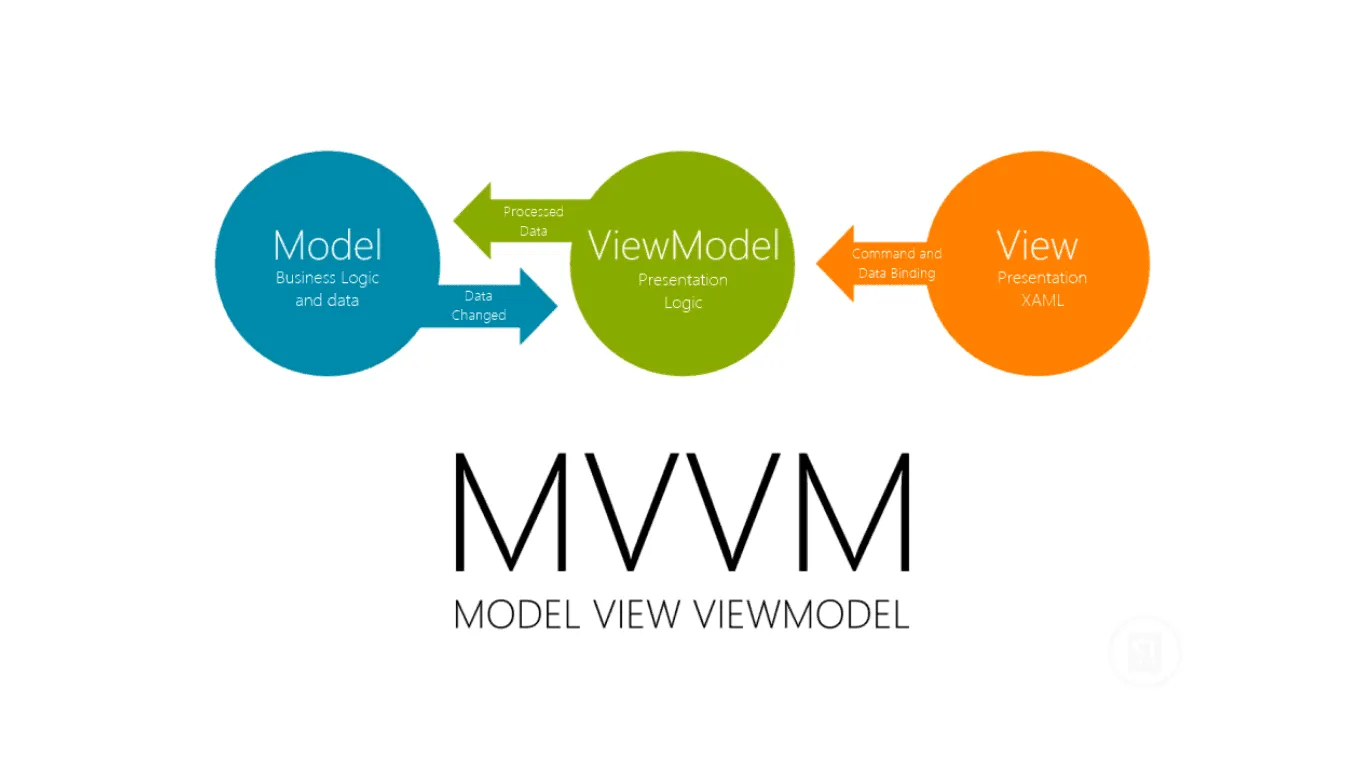
Model-View-ViewModel (MVVM) - Part 4 - INotifyDataErrorInfo

MVVM
  1. Model-View-ViewModel (MVVM) - Overview
  2. Model-View-ViewModel (MVVM) - IDisposable
  3. Model-View-ViewModel (MVVM) - INotifyPropertyChanged
  4. Model-View-ViewModel (MVVM) - INotifyDataErrorInfo

In this next part, I'm going to discuss validation of your view models using the INotifyDataErrorInfo interface. Validation is an often ignored part of the Model-View-ViewModel (MVVM) story. If you need to create a form for your users to fill in (which is probably most applications, I would have thought), then you probably need to validate user input in some way and the INotifyDataErrorInfo interface can get you there.
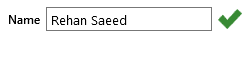
INotifyDataErrorInfo Valid TextBox

That was a valid TextBox using INotifyDataErrorInfo.
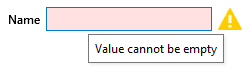
INotifyDataErrorInfo Invalid TextBox

That was an invalid TextBox using INotifyDataErrorInfo.

In the example above you can see a name text box which requires text, to be in a valid state. In the valid state there is a big green tick next to the text box and conversely in an invalid state, there is a big yellow warning sign, the text box background becomes pink and you get a nice tool-tip telling you what the error is. By the way, this example is taken from my Elysium Extra WPF project which is freely available on GitHub.

How Does It Work?

You can see the interface and its corresponding event arguments below. If the name property in our view model changes and is empty then the state of our view model is invalid, we can raise the ErrorsChanged event, set the HasErrors property to return true and make any calls to GetErrors return a list of the errors (In our case we only have one but there could be multiple errors).

namespace System.ComponentModel
{
    public interface INotifyDataErrorInfo
    {
        bool HasErrors { get; }

        event EventHandler<DataErrorsChangedEventArgs> ErrorsChanged;

        IEnumerable GetErrors(string propertyName);
    }
    
    public class DataErrorsChangedEventArgs : EventArgs
    {
        public DataErrorsChangedEventArgs(string propertyName);

        public virtual string PropertyName { get; }
    }
}

That's a fair amount of work and a base class to do all that makes life much easier. So what are the main aims of a base class implementing INotifyDataErrorInfo?

  • Integration - I usually want to raise an error in response to a property changing. So, we probably want to also implement INotifyPropertyChanged. Handily, I showed how best to create a base class for that in my last article in this series. So our new base class can inherit from the NotifyPropertyChanges base class.
  • Performance - Performance is king. It needs to be fast and I mean really fast. You can't afford for your UI to freeze up while your view model works out if it has an error to raise or not. Some validation frameworks use an attribute based approach but this requires reflection so we will not be using that here.
  • Reactive Extensions (Rx) - Events are old school, I want an observable error changed event notification system instead of the ErrorsChanged C# event.
  • Human Error - I don't want to raise error change events for properties that don't exist by accident.
  • Has it Really Error'ed - I don't want to raise a error changed event twice by accident or if it has not really error'ed.

So, without further ado, here is my implementation. Note that there are three classes:

namespace Framework.ComponentModel
{
    using System;
    using System.Collections;
    using System.Collections.Generic;
    using System.ComponentModel;
    using System.Diagnostics;
    using System.Linq;
    using System.Reactive.Linq;
    using System.Reflection;
    using System.Runtime.CompilerServices;
    using Framework.ComponentModel.Rules;

    /// <summary>
    /// Provides functionality to provide errors for the object if it is in an invalid state.
    /// </summary>
    /// <typeparam name="T">The type of this instance.</typeparam>
    public abstract class NotifyDataErrorInfo<T> : NotifyPropertyChanges, INotifyDataErrorInfo
        where T : NotifyDataErrorInfo<T>
    {
        private const string HasErrorsPropertyName = "HasErrors";

        private static RuleCollection<T> rules = new RuleCollection<T>();

        private Dictionary<string, List<object>> errors;

        /// <summary>
        /// Occurs when the validation errors have changed for a property or for the entire object. 
        /// </summary>
        event EventHandler<DataErrorsChangedEventArgs> INotifyDataErrorInfo.ErrorsChanged
        {
            add { this.errorsChanged += value; }
            remove { this.errorsChanged -= value; }
        }

        /// <summary>
        /// Occurs when the validation errors have changed for a property or for the entire object. 
        /// </summary>
        private event EventHandler<DataErrorsChangedEventArgs> errorsChanged;

        /// <summary>
        /// Gets the when errors changed observable event. Occurs when the validation errors have changed for a property or for the entire object. 
        /// </summary>
        /// <value>
        /// The when errors changed observable event.
        /// </value>
        public IObservable<string> WhenErrorsChanged
        {
            get
            {
                return Observable
                    .FromEventPattern<DataErrorsChangedEventArgs>(
                        h => this.errorsChanged += h,
                        h => this.errorsChanged -= h)
                    .Select(x => x.EventArgs.PropertyName);
            }
        }

        /// <summary>
        /// Gets a value indicating whether the object has validation errors. 
        /// </summary>
        /// <value><c>true</c> if this instance has errors, otherwise <c>false</c>.</value>
        public virtual bool HasErrors
        {
            get
            {
                this.InitializeErrors();
                return this.errors.Count > 0;
            }
        }

        /// <summary>
        /// Gets the rules which provide the errors.
        /// </summary>
        /// <value>The rules this instance must satisfy.</value>
        protected static RuleCollection<T> Rules => rules;

        /// <summary>
        /// Gets the validation errors for the entire object.
        /// </summary>
        /// <returns>A collection of errors.</returns>
        public IEnumerable GetErrors() => this.GetErrors(null);

        /// <summary>
        /// Gets the validation errors for a specified property or for the entire object.
        /// </summary>
        /// <param name="propertyName">Name of the property to retrieve errors for. <c>null</c> to 
        /// retrieve all errors for this instance.</param>
        /// <returns>A collection of errors.</returns>
        public IEnumerable GetErrors(string propertyName)
        {
            Debug.Assert(
                string.IsNullOrEmpty(propertyName) ||
                (this.GetType().GetRuntimeProperty(propertyName) != null),
                "Check that the property name exists for this instance.");

            this.InitializeErrors();

            IEnumerable result;
            if (string.IsNullOrEmpty(propertyName))
            {
                List<object> allErrors = new List<object>();

                foreach (KeyValuePair<string, List<object>> keyValuePair in this.errors)
                {
                    allErrors.AddRange(keyValuePair.Value);
                }

                result = allErrors;
            }
            else
            {
                if (this.errors.ContainsKey(propertyName))
                {
                    result = this.errors[propertyName];
                }
                else
                {
                    result = new List<object>();
                }
            }

            return result;
        }

        /// <summary>
        /// Raises the PropertyChanged event.
        /// </summary>
        /// <param name="propertyName">Name of the property.</param>
        protected override void OnPropertyChanged([CallerMemberName] string propertyName = null)
        {
            base.OnPropertyChanged(propertyName);

            if (string.IsNullOrEmpty(propertyName))
            {
                this.ApplyRules();
            }
            else
            {
                this.ApplyRules(propertyName);
            }

            base.OnPropertyChanged(HasErrorsPropertyName);
        }

        /// <summary>
        /// Called when the errors have changed.
        /// </summary>
        /// <param name="propertyName">Name of the property.</param>
        protected virtual void OnErrorsChanged([CallerMemberName] string propertyName = null)
        {
            Debug.Assert(
                string.IsNullOrEmpty(propertyName) ||
                (this.GetType().GetRuntimeProperty(propertyName) != null),
                "Check that the property name exists for this instance.");

            EventHandler<DataErrorsChangedEventArgs> eventHandler = this.errorsChanged;

            if (eventHandler != null)
            {
                eventHandler(this, new DataErrorsChangedEventArgs(propertyName));
            }
        }

        /// <summary>
        /// Applies all rules to this instance.
        /// </summary>
        private void ApplyRules()
        {
            this.InitializeErrors();

            foreach (string propertyName in rules.Select(x => x.PropertyName))
            {
                this.ApplyRules(propertyName);
            }
        }

        /// <summary>
        /// Applies the rules to this instance for the specified property.
        /// </summary>
        /// <param name="propertyName">Name of the property.</param>
        private void ApplyRules(string propertyName)
        {
            this.InitializeErrors();

            List<object> propertyErrors = rules.Apply((T)this, propertyName).ToList();

            if (propertyErrors.Count > 0)
            {
                if (this.errors.ContainsKey(propertyName))
                {
                    this.errors[propertyName].Clear();
                }
                else
                {
                    this.errors[propertyName] = new List<object>();
                }

                this.errors[propertyName].AddRange(propertyErrors);
                this.OnErrorsChanged(propertyName);
            }
            else if (this.errors.ContainsKey(propertyName))
            {
                this.errors.Remove(propertyName);
                this.OnErrorsChanged(propertyName);
            }
        }

        /// <summary>
        /// Initializes the errors and applies the rules if not initialized.
        /// </summary>
        private void InitializeErrors()
        {
            if (this.errors == null)
            {
                this.errors = new Dictionary<string, List<object>>();

                this.ApplyRules();
            }
        }
    }
}

namespace Framework.ComponentModel.Rules
{
    using System;

    /// <summary>
    /// A named rule containing an error to be used if the rule fails.
    /// </summary>
    /// <typeparam name="T">The type of the object the rule applies to.</typeparam>
    public abstract class Rule<T>
    {
        private string propertyName;
        private object error;

        /// <summary>
        /// Initializes a new instance of the <see cref="Rule<T>"/> class.
        /// </summary>
        /// <param name="propertyName">The name of the property this instance applies to.</param>
        /// <param name="error">The error message if the rules fails.</param>
        protected Rule(string propertyName, object error)
        {
            if (propertyName == null)
            {
                throw new ArgumentNullException(nameof(propertyName));
            }

            if (error == null)
            {
                throw new ArgumentNullException(nameof(error));
            }

            this.propertyName = propertyName;
            this.error = error;
        }

        /// <summary>
        /// Gets the name of the property this instance applies to.
        /// </summary>
        /// <value>The name of the property this instance applies to.</value>
        public string PropertyName => this.propertyName;

        /// <summary>
        /// Gets the error message if the rules fails.
        /// </summary>
        /// <value>The error message if the rules fails.</value>
        public object Error => this.error;

        /// <summary>
        /// Applies the rule to the specified object.
        /// </summary>
        /// <param name="obj">The object to apply the rule to.</param>
        /// <returns>
        /// <c>true</c> if the object satisfies the rule, otherwise <c>false</c>.
        /// </returns>
        public abstract bool Apply(T obj);
    }
}

namespace Framework.ComponentModel.Rules
{
    using System;

    /// <summary>
    /// Determines whether or not an object of type <typeparamref name="T"/> satisfies a rule and
    /// provides an error if it does not.
    /// </summary>
    /// <typeparam name="T">The type of the object the rule can be applied to.</typeparam>
    public sealed class DelegateRule<T> : Rule<T>
    {
        private Func<T, bool> rule;

        /// <summary>
        /// Initializes a new instance of the <see cref="DelegateRule<T>"/> class.
        /// </summary>
        /// <param name="propertyName">>The name of the property the rules applies to.</param>
        /// <param name="error">The error if the rules fails.</param>
        /// <param name="rule">The rule to execute.</param>
        public DelegateRule(string propertyName, object error, Func<T, bool> rule)
            : base(propertyName, error)
        {
            if (rule == null)
            {
                throw new ArgumentNullException(nameof(rule));
            }

            this.rule = rule;
        }

        /// <summary>
        /// Applies the rule to the specified object.
        /// </summary>
        /// <param name="obj">The object to apply the rule to.</param>
        /// <returns>
        /// <c>true</c> if the object satisfies the rule, otherwise <c>false</c>.
        /// </returns>
        public override bool Apply(T obj) => this.rule(obj);
    }
}

namespace Framework.ComponentModel.Rules
{
    using System;
    using System.Collections.Generic;
    using System.Collections.ObjectModel;

    /// <summary>
    /// A collection of rules.
    /// </summary>
    /// <typeparam name="T">The type of the object the rules can be applied to.</typeparam>
    public sealed class RuleCollection<T> : Collection<Rule<T>>
    {
        /// <summary>
        /// Adds a new <see cref="Rule{T}"/> to this instance.
        /// </summary>
        /// <param name="propertyName">The name of the property the rules applies to.</param>
        /// <param name="error">The error if the object does not satisfy the rule.</param>
        /// <param name="rule">The rule to execute.</param>
        public void Add(string propertyName, object error, Func<T, bool> rule) =>
            this.Add(new DelegateRule<T>(propertyName, error, rule));

        /// <summary>
        /// Applies the <see cref="Rule{T}"/>'s contained in this instance to <paramref name="obj"/>.
        /// </summary>
        /// <param name="obj">The object to apply the rules to.</param>
        /// <param name="propertyName">Name of the property we want to apply rules for. <c>null</c>
        /// to apply all rules.</param>
        /// <returns>A collection of errors.</returns>
        public IEnumerable<object> Apply(T obj, string propertyName)
        {
            List<object> errors = new List<object>();

            foreach (Rule<T> rule in this)
            {
                if (string.IsNullOrEmpty(propertyName) || rule.PropertyName.Equals(propertyName))
                {
                    if (!rule.Apply(obj))
                    {
                        errors.Add(rule.Error);
                    }
                }
            }

            return errors;
        }
    }
}

Simple Example

An example of how you can use this base class is as follows.

public class ZombieViewModel : NotifyDataErrorInfo<ZombieViewModel>
{
    private string name;
    private int limbsRemaining;

    static ZombieViewModel()
    {
        Rules.Add(new DelegateRule<ZombieViewModel>(
            "Name",
            "Name cannot be empty.",
            x => !string.IsNullOrEmpty(x.Name)));
        Rules.Add(new DelegateRule<ZombieViewModel>(
            "LimbsRemaining",
            "A zombie can't have less than zero limbs.",
            x => x.LimbsRemaining >= 0));
        Rules.Add(new DelegateRule<ZombieViewModel>(
            "LimbsRemaining",
            "A zombie can only have up to four limbs.",
            x => x.LimbsRemaining <= 4));
    }

    public string Name
    {
        get => this.name;
        set => this.SetProperty(ref this.name, value);
    }

    public int LimbsRemaining
    {
        get => this.limbsRemaining;
        set => this.SetProperty(ref this.limbsRemaining, value);
    }
}

As you can see, our view model has two properties and as shown in the last post in the series we are using the SetProperty method to raise PropertyChanged events. The only bit I've added for validation is in the static constructor containing the three validation rules.

The Name property has a single rule applied to it. When the name is empty a validation error is raised. The LimbsRemaining property has two rules and when it is less than zero or more than four, validation errors are raised auto-magically.

Under the covers, each time the PropertyChanged event is raised, we apply the corresponding rule relating to the property and if the rule fails, we raise the ErrorsChanged event, raise a PropertyChanged event for the HasErrors property (Which is now true) and finally ensure that any calls to GetErrors now returns the error shown in the rule.

Extensibility

The DelegateRule<T> class shown above is a really easy way to provide nice, simple rules. If you need something more complex you can create your own rule by inheriting from the Rule<T> base class. An example of this could be a custom rule to validate an email address or telephone number.

Using Reactive Extensions (Rx) to Replace the ErrorsChanged Event

C# events are old school. Reactive Extensions (Rx) provides a cleaner and far more powerful drop-in replacement for C# events. I'm not going to go over the advantages of Reactive Extensions here but you can take a look at a series of blog posts I've done in the past.

We can hide the ErrorsChanged C# event by explicitly implementing the interface (Click here for details on implicit versus explicit implementations of interfaces).

The ErrorsChanged C# event can still be accessed by first casting the object to INotifyDataErrorInfo. Validation in XAML languages, which uses this interface continues to work. Our new Reactive Extensions (Rx) observable event called WhenErrorsChanged of type? IObservable<string> (The string is the property name) is now the default method of subscribing for error changed events and we've hidden away the old C# event.

INotifyDataErrorInfo Support

The INotifyDataErrorInfo interface is supported by most XAML frameworks including WPF, Silverlight and Windows Phone. Currently WinRT does not support the interface at the time of writing but you can bet that they will in future and in the mean time you can use the WinRT XAML Validation library in conjunction with the code below to plug this gap.

Quick nod to IDataErrorInfo

This interface used to be used for validation but was replaced by INotifyDataErrorInfo. The new interface provides a much nicer API which is easier to code against and better performance. If you are still using the old interface, its time to make the change.

Conclusions

I have been tweaking this base class for the last few years and feel I've got a fairly good balance. I've not seen too many implementations of this interface, most blogs seem to cover INotifyPropertyChanged pretty well though. I'd be very interested if anyone has any comments or thoughts on improvements. Feel free to sound-off in the comments.

Web Mentions

What's this?

0 Replies

GitHub Comments

RehanSaeed

Nicolas Nicolas commented on 2014-11-08 22:44:40

Hi,

What is RuleCollection in this private static RuleCollection rules = new RuleCollection();

/// 
/// Gets the rules which provide the errors.
/// 
/// The rules this instance must satisfy.
protected static RuleCollection Rules
{
    get { return rules; }
}

I cannot figure this out if it is a list or anything else. Can you define it some where.
Everything else is awesome.

RehanSaeed

Muhammad Rehan Saeed Muhammad Rehan Saeed commented on 2014-11-09 12:04:44

Hi,

What is RuleCollection in this private static RuleCollection rules = new RuleCollection();

/// 
/// Gets the rules which provide the errors.
/// 
/// The rules this instance must satisfy.
protected static RuleCollection Rules
{
    get { return rules; }
}

I cannot figure this out if it is a list or anything else. Can you define it some where.
Everything else is awesome.

It holds the validation rules for your view model.

For a real example look at the Validation tab in the Elysium Extra sample application. You can find the project on CodePlex, there are posts on my blog or install the Elysium.Extra NuGet package which also contains the sample application and source code.

That example shows how the above code can be used to validate input from various controls including TextBox, ComboBox and DatePicker with cool effects too.

RehanSaeed

Nicolas Nicolas commented on 2014-11-10 14:42:36

It holds the validation rules for your view model.

For a real example look at the Validation tab in the Elysium Extra sample application. You can find the project on CodePlex, there are posts on my blog or install the Elysium.Extra NuGet package which also contains the sample application and source code.

That example shows how the above code can be used to validate input from various controls including TextBox, ComboBox and DatePicker with cool effects too.

Thanks

RehanSaeed

Suhas Suhas commented on 2015-06-12 16:07:17

Hey I have been reading your implementations for these classes and have been using them for development. I notice that you have implemented your INotifyErrorInfo & INotifyPropertyChanged as two classes rather than interfaces. This would mean that I cannot define a BaseViewModel class that can handle Error Notifications and Property changed notifications concurrently. Am I incorrect in my assessment? How do you deal with something like this? (example Login page where you need to implement INotifyPropertyChanged to show a Splash Screen when the password is entered & a key command is pressed but also throw exceptions for your credentials.)
By the way,Great implementation for Elysium Extra. Makes UI much easier!.
Thanks,
Suhas

RehanSaeed

Suhas Suhas commented on 2015-06-12 16:25:50

Sorry. Reread your post. You already thought of that and inherited from the class you defined earlier. My bad! This makes it much easier. Thanks a TON!

RehanSaeed

Muhammad Rehan Saeed Muhammad Rehan Saeed commented on 2015-06-12 17:15:08

Sorry. Reread your post. You already thought of that and inherited from the class you defined earlier. My bad! This makes it much easier. Thanks a TON!

Good stuff. You saved me from writing a really long reply.

RehanSaeed
(edited )

Rata Rata commented on 2015-10-20 19:05:03

Hi. Very nice blog, it helped me a lot!

I got a questions:

  1. Don't you think, that passing propertyName as string when you add Rules can lead to typo-like mistakes? Maybe it should be done with reflection as far as we initialize Rules only 1 time on viewmodel creation, so it will not so performance-affective but more safe for human mistakes?
  2. If I need to implement some display-related logic in viewmodel, that should run when my property changed, should i execute my method from property setter or my viewmodel should subscribe on PropertyChanged event in viewmodelBase?
    And if i should use second way, should i make switch based on string property name in method that process PropertyChanged event, or there is some alternative?

I ask this questions because im really afraid of human factor when i use string names instead of types and so on.

Sorry for my bad english.

RehanSaeed
(edited )

Muhammad Rehan Saeed Muhammad Rehan Saeed commented on 2015-10-21 17:13:30

Hi. Very nice blog, it helped me a lot!

I got a questions:

  1. Don't you think, that passing propertyName as string when you add Rules can lead to typo-like mistakes? Maybe it should be done with reflection as far as we initialize Rules only 1 time on viewmodel creation, so it will not so performance-affective but more safe for human mistakes?
  2. If I need to implement some display-related logic in viewmodel, that should run when my property changed, should i execute my method from property setter or my viewmodel should subscribe on PropertyChanged event in viewmodelBase?
    And if i should use second way, should i make switch based on string property name in method that process PropertyChanged event, or there is some alternative?

I ask this questions because im really afraid of human factor when i use string names instead of types and so on.

Sorry for my bad english.

Hi,

  1. Yes it can. That's why you can use the [CallerMemberName] attribute or the new C# 6 nameof operator. Reflection is slow but maybe it works for you if you can't use C# 6.
  2. I tend to call the method in the property setter as the property changed event handler can be called if any other property changes too.

Hope that helps.

RehanSaeed

Ali Ali commented on 2016-03-03 20:29:13

Hi Rehan

Thanks for your article; i have learned a lot from it; i am new to WPF and wondering if following can be done. I have created following classes and want to add addition rules in owner class for re-usability of FMName class:

public class FMName : NotifyDataErrorInfo
{
    private string _FirstName;
    private string _MiddleName;
    private string _LastName;

    static FMName()
    {
        Rules.Add(new Base.Rules.DelegateRule(
            "FirstName", "Name cannot be Empty", x => !string.IsNullOrEmpty(x.FirstName)));
        Rules.Add(new Base.Rules.DelegateRule(
            "LastName", "Name cannot be Empty", x => !string.IsNullOrEmpty(x.FirstName)));
        Rules.Add(new Base.Rules.DelegateRule(
            "MiddleName", "Name cannot be Empty", x => !string.IsNullOrEmpty(x.FirstName)));
    }

    public string LastName
    {
        get { return this._LastName; }
        set { this.SetProperty(ref this._LastName, value); }
    }

    public string MiddleName
    {
        get { return _MiddleName; }
        set { this.SetProperty(ref this._MiddleName, value); }
    }

    public string FirstName
    {
        get { return _FirstName; }
        set { this.SetProperty(ref this._FirstName, value); }
    }
}

public class Owner : NotifyDataErrorInfo
{
    private int _OwnerID;
    private FMName _OwnerName = new FMName();
 
    static Owner()
    {
        Rules.Add(new Base.Rules.DelegateRule(
           "Owner.FirstName",
           "Owner First Name Cannot have less than 4 Characters",
           x => x.OwnerName.FirstName.Length < 4);
    }
 
    public int OwnerID
    {
        get { return this._OwnerID; }
        set { this.SetProperty(ref this._OwnerID, value); }
    }
 
    public FMName OwnerName
    {
        get { return _OwnerName; }
        set { this.SetProperty(ref this._OwnerName, value); }
    }
}

I am getting property doesn't exist in following:

static Owner()
{
    Rules.Add(new Base.Rules.DelegateRule(
        "Owner.FirstName", "Owner First Name Cannot have less than 4 Characters", x => x.OwnerName.FirstName.Lengt < 4));
}

Thanks again!

Ali

RehanSaeed

Muhammad Rehan Saeed Muhammad Rehan Saeed commented on 2016-03-03 21:25:01

Hi Rehan

Thanks for your article; i have learned a lot from it; i am new to WPF and wondering if following can be done. I have created following classes and want to add addition rules in owner class for re-usability of FMName class:

public class FMName : NotifyDataErrorInfo
{
    private string _FirstName;
    private string _MiddleName;
    private string _LastName;

    static FMName()
    {
        Rules.Add(new Base.Rules.DelegateRule(
            "FirstName", "Name cannot be Empty", x => !string.IsNullOrEmpty(x.FirstName)));
        Rules.Add(new Base.Rules.DelegateRule(
            "LastName", "Name cannot be Empty", x => !string.IsNullOrEmpty(x.FirstName)));
        Rules.Add(new Base.Rules.DelegateRule(
            "MiddleName", "Name cannot be Empty", x => !string.IsNullOrEmpty(x.FirstName)));
    }

    public string LastName
    {
        get { return this._LastName; }
        set { this.SetProperty(ref this._LastName, value); }
    }

    public string MiddleName
    {
        get { return _MiddleName; }
        set { this.SetProperty(ref this._MiddleName, value); }
    }

    public string FirstName
    {
        get { return _FirstName; }
        set { this.SetProperty(ref this._FirstName, value); }
    }
}

public class Owner : NotifyDataErrorInfo
{
    private int _OwnerID;
    private FMName _OwnerName = new FMName();
 
    static Owner()
    {
        Rules.Add(new Base.Rules.DelegateRule(
           "Owner.FirstName",
           "Owner First Name Cannot have less than 4 Characters",
           x => x.OwnerName.FirstName.Length < 4);
    }
 
    public int OwnerID
    {
        get { return this._OwnerID; }
        set { this.SetProperty(ref this._OwnerID, value); }
    }
 
    public FMName OwnerName
    {
        get { return _OwnerName; }
        set { this.SetProperty(ref this._OwnerName, value); }
    }
}

I am getting property doesn't exist in following:

static Owner()
{
    Rules.Add(new Base.Rules.DelegateRule(
        "Owner.FirstName", "Owner First Name Cannot have less than 4 Characters", x => x.OwnerName.FirstName.Lengt < 4));
}

Thanks again!

Ali

Hmmmm, I'm not sure that would work. You are creating a validation rule for FMName.FirstName but in the Owner class, I would say this is bad from a design perspective. That rule should live in FMName. If you need to turn the rule on or off under certain conditions then this can be part of the rule itself.

RehanSaeed

Ali Ali commented on 2016-03-03 21:45:20

Hmmmm, I'm not sure that would work. You are creating a validation rule for FMName.FirstName but in the Owner class, I would say this is bad from a design perspective. That rule should live in FMName. If you need to turn the rule on or off under certain conditions then this can be part of the rule itself.

Is there any way I turn the rule on/off from owner class?

RehanSaeed

Muhammad Rehan Saeed Muhammad Rehan Saeed commented on 2016-03-03 22:01:11

Is there any way I turn the rule on/off from owner class?

Your owner class could set a boolean property on the child class to turn the property on or off. When the boolean property changes, you can raise a PropertyChanged notification for FirstName which will cause the rule to be re-evaluated.

RehanSaeed

Ali Ali commented on 2016-03-03 22:06:53

Your owner class could set a boolean property on the child class to turn the property on or off. When the boolean property changes, you can raise a PropertyChanged notification for FirstName which will cause the rule to be re-evaluated.

I will try that, thanks a lot.

RehanSaeed

Alex C Alex C commented on 2016-04-06 19:19:16

Hi. This is a great article. As a noob, I'm wondering how the errors would be displayed in the XAML. Do you have a sample of that?

RehanSaeed

Muhammad Rehan Saeed Muhammad Rehan Saeed commented on 2016-04-07 09:05:15

Hi. This is a great article. As a noob, I'm wondering how the errors would be displayed in the XAML. Do you have a sample of that?

There is a working example in Elysium Extra or see this.

RehanSaeed

Nuri Nuri commented on 2016-05-09 09:17:43

Hi Muhammad,

Nice page. Thanks.
I'm wondering that how can I handle (forexample display dialog to user) when Command throw exception? Command called by View, it mutes when catch exception.

RehanSaeed

Muhammad Rehan Saeed Muhammad Rehan Saeed commented on 2016-05-09 14:51:15

Hi Muhammad,

Nice page. Thanks.
I'm wondering that how can I handle (forexample display dialog to user) when Command throw exception? Command called by View, it mutes when catch exception.

First don't use exceptions to write application logic. If something is invalid, try to use an 'if statement' instead. If you still need to catch an exception, then go for it. Not sure what you mean by 'mutes'.

RehanSaeed

Jason Jason commented on 2016-06-21 22:41:49

Probably one the best MVVM series I've read.
How do you deal with binding errors from the view? Consider the situation where the user enters letters into textbox that is bound to an integer property in your view model. The view model is remains in a valid state because the change never got that far.

RehanSaeed

Muhammad Rehan Saeed Muhammad Rehan Saeed commented on 2016-06-22 15:29:21

Probably one the best MVVM series I've read.
How do you deal with binding errors from the view? Consider the situation where the user enters letters into textbox that is bound to an integer property in your view model. The view model is remains in a valid state because the change never got that far.

The way to deal with binding errors is to not have them. You get notified of them in the output window in Visual Studio, so it's pretty easy to find and fix them.

If you are asking about how to do the XAML side of validation, then take a look at the Elysium Extra on Codeplex which has a very good example.

RehanSaeed

Jason Jason commented on 2016-06-23 20:13:41

Thanks for the reply. Silverlight has a BindingValidationError routedevent on the FrameworkElement that needs to be handled in a robust application. If you don't, the view could be in an invalid state while the view model remains valid. I suspect WPF and others have similar issues, but using different events. I think the Prism library examples expose all view model properties as nullable even though they are required to get around some of it. Since the binding mechanism defaults to null on binding error, this method will work for required fields. It will fail if the user puts garbage into a field that isn't required. The user will think they saved garbage while the view model saved an empty field. I just thought you might be familiar with the problem and already had a slick implementation. Cheers.

RehanSaeed

Anders Anders commented on 2016-10-14 09:40:22

That's 300 lines of code to validate if a textbox is empty!!! GEESUS !!!

RehanSaeed

Muhammad Rehan Saeed Muhammad Rehan Saeed commented on 2016-10-14 10:04:54

That's 300 lines of code to validate if a textbox is empty!!! GEESUS !!!

That's 300 lines you don't need to write! Look how clean and simple the ZombieViewModel looks because of those 300 lines!

RehanSaeed

Mark Mark commented on 2016-12-21 04:22:57

Awesome work btw!

RehanSaeed

Artur Artur commented on 2017-03-18 22:57:49

Is it possible to write a required if rule with this approach?
I need to raise exception only if not all 3 properties are filled at the same time. When none of them is filled, I don't want to raise exception.

Could you help me?
Thanks in advance

RehanSaeed

Muhammad Rehan Saeed Muhammad Rehan Saeed commented on 2017-03-23 16:34:05

Is it possible to write a required if rule with this approach?
I need to raise exception only if not all 3 properties are filled at the same time. When none of them is filled, I don't want to raise exception.

Could you help me?
Thanks in advance

Something like this? You can refer to other properties in the rule condition.

Rules.Add(new DelegateRule<myviewmodel>(
    "Item",
    "Item cannot be empty.",
    x => string.IsNullOrEmpty(x.SomeOtherProperty) || !string.IsNullOrEmpty(x.Item)));
RehanSaeed

Kevin Burns Kevin Burns commented on 2017-04-11 16:47:29

I am trying to figure out how to implement this with a ViewModel that is part of a base class.

This doesn't work obviously, aside from copying the base class properties/functions constantly. Is there an easier way of handling this?

public sealed class AgentViewModel : EditorBaseViewModel, NotifyDataErrorInfo
{
}
RehanSaeed

Ole Ole commented on 2017-10-17 16:07:08

Nice article. Looks very clean. How do you handle issues where you have one or more 'related' properties? if you update one property, you need to trigger a validation of the related property(ies), because they could be invalid because of the update.

RehanSaeed

Muhammad Rehan Saeed Muhammad Rehan Saeed commented on 2017-10-18 09:21:41

Nice article. Looks very clean. How do you handle issues where you have one or more 'related' properties? if you update one property, you need to trigger a validation of the related property(ies), because they could be invalid because of the update.

You can pass multiple property names to both the SetProperty and OnPropertyChanged methods. To avoid using strings, you can use the nameof keyword.

RehanSaeed

Kevin Burns Kevin Burns commented on 2017-11-07 21:55:21

Is there anyone to implement this properly for a Collection count? I have an observable collection, and the rule is setup to throw when the count <= 0. It is showing an error around the listbox bound to the collection, even when the itemsource has items in it. Any ideas?

RehanSaeed

Muhammad Rehan Saeed Muhammad Rehan Saeed commented on 2017-11-13 09:19:51

Is there anyone to implement this properly for a Collection count? I have an observable collection, and the rule is setup to throw when the count <= 0. It is showing an error around the listbox bound to the collection, even when the itemsource has items in it. Any ideas?

You don't say it but probably the problem you are having is that you are not calling OnPropertyChanged("Count") which will cause the validation logic to get called and the listbox to update.

RehanSaeed

Max Max commented on 2018-01-23 11:31:47

Very nice approach!
I have a ViewModel that contains a list of Sub-ViewModels and that has to be erroneous if any of them has an error. What would be the right approach to fire ErrorsChanged on the upper ViewModel when any of the Sub-ViewModels raises WhenErrorsChanged?

RehanSaeed

Muhammad Rehan Saeed Muhammad Rehan Saeed commented on 2018-01-23 12:21:26

Very nice approach!
I have a ViewModel that contains a list of Sub-ViewModels and that has to be erroneous if any of them has an error. What would be the right approach to fire ErrorsChanged on the upper ViewModel when any of the Sub-ViewModels raises WhenErrorsChanged?

I've done this in a few ways myself. Ideally each class is encapsulated and you register for the childs ErrorsChanged event and bubble it up manually.

RehanSaeed

Max Max commented on 2018-01-23 12:39:40

I've done this in a few ways myself. Ideally each class is encapsulated and you register for the childs ErrorsChanged event and bubble it up manually.

I've already subscribed to the WhenErrorsChanged of my Sub-ViewModels, but I don't see how to trigger the WhenErrorsChanged of the upper ViewModel.
Raising ErrorsChanged requires DataErrorsChangedEventArgs with property name, which I don't have.

RehanSaeed

Ollie Ollie commented on 2018-02-21 08:14:57

Referring to Kevin Burns's question from April 11th of 2017: I'm also curious about how this can be solved.

RehanSaeed

Fred Fred commented on 2019-04-05 08:23:52

Hey Rehan,

thank you for your work on this!

My question is, if it is possible to use the "old school" C# events instead of the Rx events? So how to replace the IObservable WhenErrorsChanged with the defualt C# events. I'm not sure if I want to use the Rx Framework just for the Observable class.

Thanks
Fred

RehanSaeed

Muhammad Rehan Saeed Muhammad Rehan Saeed commented on 2019-04-05 09:15:35

Hey Rehan,

thank you for your work on this!

My question is, if it is possible to use the "old school" C# events instead of the Rx events? So how to replace the IObservable WhenErrorsChanged with the defualt C# events. I'm not sure if I want to use the Rx Framework just for the Observable class.

Thanks
Fred

If you're familiar with C# events, you can easily plug them in, in place of the Rx equivalents.

public event EventHandler Foo;

public void OnFoo() => this.Foo?.Invoke(this, EventArgs.Empty);
RehanSaeed

Thavious Thavious commented on 2019-05-17 15:03:36

Why did you implement this set of rules, rather than using something existing like DataAnnotations?

RehanSaeed

Muhammad Rehan Saeed Muhammad Rehan Saeed commented on 2019-06-11 12:31:52

Why did you implement this set of rules, rather than using something existing like DataAnnotations?

I prefer functions over attributes. They are more powerful, simpler to reason about and faster.

RehanSaeed

Remy Meier Remy Meier commented on 2019-06-12 21:53:06

Quite good coded and commented. My Visual Studio shows me an error for Observable. This cannot find the class. Which part of the .NET framework is to use for using?

RehanSaeed

Muhammad Rehan Saeed Muhammad Rehan Saeed commented on 2019-06-15 10:38:39

Quite good coded and commented. My Visual Studio shows me an error for Observable. This cannot find the class. Which part of the .NET framework is to use for using?

You can find that in the System.Reactive package.

RehanSaeed

David Piepgrass David Piepgrass commented on 2019-07-31 22:45:44

This is all very nice, but how do you write the corresponding XAML for the view?

RehanSaeed

Pete Pete commented on 2019-09-04 16:43:41

I love this implementation to establish rules but I have an issue.

I have added rules to my tblCompany model for when creating a new Company the rules ensure the relevant information is added. Although when I use a List as an Itemssource for a Combobox the rules are still in affect. So when a Company is selected the Combobox goes red if one of the rules aren't met. I would like to be able to ignore the rules on the model in some certain circumstances if possible??

RehanSaeed

Muhammad Rehan Saeed Muhammad Rehan Saeed commented on 2019-09-23 09:02:22

I love this implementation to establish rules but I have an issue.

I have added rules to my tblCompany model for when creating a new Company the rules ensure the relevant information is added. Although when I use a List as an Itemssource for a Combobox the rules are still in affect. So when a Company is selected the Combobox goes red if one of the rules aren't met. I would like to be able to ignore the rules on the model in some certain circumstances if possible??

Sure they can be ignored. Just add a property to the view model called something like IsValidationEnabled. When it is false, make all your rules valid. When it is true, then run the code in your rules as normal.

RehanSaeed

MarkusB MarkusB commented on 2019-10-08 09:11:15

Very nice solution!
But i have a problem with inherited classes.

I've created a BaseClass named NotifyDataErrorInfo like you and a Class

public class ValidationExample : NotifyDataErrorInfoBase<ValidationExample>
{
}

All works great.

Now i want another inherited class

public class ValidationDerivedExample : ValidationExample
{
    private int _subVar;

    public int SubVar
    {
        get { return this._subVar; }
        set { this.SetProperty(ref this._subVar, value, "SubVar"); }
    }

    static ValidationDerivedExample()
    {
        Rules.Add(new DelegateRule<ValidationDerivedExample> (
            "SubVar",
            "SubVar cannot be < 0.",
            x => (x.SubVar < 0));
    }
}

And add Rules -> that doesn't work
Can you give me please an advice.

RehanSaeed

Muhammad Rehan Saeed Muhammad Rehan Saeed commented on 2019-10-10 20:11:28

Very nice solution!
But i have a problem with inherited classes.

I've created a BaseClass named NotifyDataErrorInfo like you and a Class

public class ValidationExample : NotifyDataErrorInfoBase<ValidationExample>
{
}

All works great.

Now i want another inherited class

public class ValidationDerivedExample : ValidationExample
{
    private int _subVar;

    public int SubVar
    {
        get { return this._subVar; }
        set { this.SetProperty(ref this._subVar, value, "SubVar"); }
    }

    static ValidationDerivedExample()
    {
        Rules.Add(new DelegateRule<ValidationDerivedExample> (
            "SubVar",
            "SubVar cannot be < 0.",
            x => (x.SubVar < 0));
    }
}

And add Rules -> that doesn't work
Can you give me please an advice.

Yes it gets a bit tricky here. I can't remember what my goto solution was but you can fix this in a couple of ways. You can cast in the rule:

Rules.Add(new DelegateRule<ValidationExample> (
    "SubVar",
    "SubVar cannot be < 0.",
    x => (((ValidationDerivedExample)x).SubVar < 0));

Or you can move the generic type up the chain:

public class ValidationExample<T> : NotifyDataErrorInfoBase<T>
    where T : ValidationSubExample
{
}

public class ValidationDerivedExample : ValidationExample<ValidationDerivedExample>
{
}
RehanSaeed
(edited )

MarkusB MarkusB commented on 2019-10-11 08:21:32

Yes it gets a bit tricky here. I can't remember what my goto solution was but you can fix this in a couple of ways. You can cast in the rule:

Rules.Add(new DelegateRule<ValidationExample> (
    "SubVar",
    "SubVar cannot be < 0.",
    x => (((ValidationDerivedExample)x).SubVar < 0));

Or you can move the generic type up the chain:

public class ValidationExample<T> : NotifyDataErrorInfoBase<T>
    where T : ValidationSubExample
{
}

public class ValidationDerivedExample : ValidationExample<ValidationDerivedExample>
{
}

Hello Rehan,

thanks for the fast reply.

Casting the rule i tried befor, unfortunately it doesn't work on runtime, i get an error at
Rules.Add(ValidationDerivedExample) because x is not of type ValidationExample

And move up the chain, is also no solution, because i want the error handly in my 'base classes' too.

Is there a possible solution without the generic type in the rule, delegateRule and ruleCollection?

RehanSaeed
(edited )

Kiwi Kiwi commented on 2019-10-11 13:39:09

I'm working on a personal project and I'm using your example code, but I'm calling NotifyDataErrorInfo ModelBase because I want my models to implement the INotifyDataError and the INotifyPropertyChanged.

From my limited knowledge of MVVM, if I want the models to implement the INotify interfaces, and I want my ViewModels to wrap around the models (and not just be a pass-through), I need to have the ViewModel intercept the model's notify event, and re-raise those events.

I don't have a 1 to 1 Model to ViewModel ratio - I have a 1 to Many Model to ViewModel ratio. I'm not sure if this is a bad design decision, but I want the models to stay alive longer than the ViewModels they will be passed to, so for that I also new weak event handlers in my ViewModels coupling to my model's notify events. To accomplish, I have made the following ViewModelBase class:

namespace MyNamespace.ViewModels
{
    abstract class ViewModelBase : Models.ModelBase where T : ViewModelBase
    {
        private object[] models;
        private static readonly Dictionary<(Type, string), string> propertyMappings = new Dictionary<(Type, string), string>();

        protected object[] Models
        {
            get => this.models;
            private set => this.models = value;
        }

        protected static Dictionary<(Type, string), string> PropertyMappings
        {
            get => propertyMappings;
        }

        private void Model_ErrorsChanged(object sender, DataErrorsChangedEventArgs e)
        {
            string propertyName = e.PropertyName;
            if (PropertyMappings.ContainsKey((sender.GetType(), propertyName))) propertyName = PropertyMappings[(sender.GetType(), propertyName)];

            // If PropertyMappings returned a null property name, that means skip the property.
            if (string.IsNullOrWhiteSpace(propertyName)) return;

            // Re-raise property changed event. Chain of events are: Model.ErrorsChanged(Model.Property) -> ViewModel.ErrorsChanged(ViewModel.Property).
            this.OnErrorsChanged(propertyName);
        }

        private void Model_PropertyChanged(object sender, PropertyChangedEventArgs e)
        {
            string propertyName = e.PropertyName;
            if (PropertyMappings.ContainsKey((sender.GetType(), propertyName))) propertyName = PropertyMappings[(sender.GetType(), propertyName)];

            // If PropertyMappings returned a null property name, that means skip the property.
            if (string.IsNullOrWhiteSpace(propertyName)) return;

            // Re-raise property changed event. Chain of events are: Model.PropertyChanged(Model.Property) -> ViewModel.PropetyChanged(ViewModel.Property).
            this.OnPropertyChanged(propertyName);
        }

        protected ViewModelBase(object model) : this(new object[] { model }) { }
        protected ViewModelBase(params object[] models)
        {
            if (models == null) throw new ArgumentNullException(nameof(models));
            if (models.Length < 1) throw new ArgumentException("At least one model is required.", nameof(models));

            this.Models = models;

            foreach (object model in this.Models)
            {
                if (model is INotifyPropertyChanged property)
                    WeakEventManager<object, PropertyChangedEventArgs>.AddHandler(model, nameof(property.PropertyChanged), this.Model_PropertyChanged);
                if (model is INotifyDataErrorInfo data)
                    WeakEventManager<object, DataErrorsChangedEventArgs>.AddHandler(model, nameof(data.ErrorsChanged), this.Model_ErrorsChanged);
            }
        }

        protected override void DisposeManaged()
        {
            foreach (object model in this.Models)
            {
                if (model is INotifyPropertyChanged property)
                    WeakEventManager<object, PropertyChangedEventArgs>.RemoveHandler(model, nameof(property.PropertyChanged), this.Model_PropertyChanged);
                if (model is INotifyDataErrorInfo data)
                    WeakEventManager<object, DataErrorsChangedEventArgs>.RemoveHandler(model, nameof(data.ErrorsChanged), this.Model_ErrorsChanged);
            }
        }
    }
}

So if my design isn't complete garbage, it should be able to have ViewModels that extend this ViewModelBase that are tied to 1 or more object models that may or may not implement the INotify interfaces. It should also be weakly bound to those events, allowing the ViewModels to GCed when the View they are attached to leaves the scope.

One part I'm a little iffy on is Dictionary<(Type, string), string> and how it will work with sub classes. I'm not overly worried about it because my small personal project shouldn't have any models that have sub classes (beyond the initial ModelBase). IE, I won't have "class Model1 : ModelBase" + "class SubModelA : Model1" - I'll only have the "Model1" class in that example, and not the "SubModelA". It would be nice if I had designed Dictionary<(Type, string), string> to work correctly whether the object raising the event was subclass or not - but I only plan on crossing that bridge when I have to (which currently seems unlikely - at least in this personal project).

Anyway, thank you for your articles - I found them very informative. I shared the above class in the hopes that if you have 5 minutes, you'll share any thoughts / wisdom you have on my approach. If not, no biggie. I'm sure I'll find the hidden gotchas once I start debugging the project.

RehanSaeed
(edited )

Muhammad Rehan Saeed Muhammad Rehan Saeed commented on 2019-10-12 10:20:10

Hello Rehan,

thanks for the fast reply.

Casting the rule i tried before, unfortunately it doesn't work on runtime, i get an error at
Rules.Add (ValidationDerivedExample)x is not of type ValidationExample

and move up the chain, is also no solution, because i want the error handy in my 'base classes' too.

Is there a possible solution without the generic type in the rule, delegateRule and ruleCollection ?

You should be able to specify rules in both classes using the generics solution.

RehanSaeed
(edited )

Muhammad Rehan Saeed Muhammad Rehan Saeed commented on 2019-10-12 10:26:31

I'm working on a personal project and I'm using your example code, but I'm calling NotifyDataErrorInfo ModelBase because I want my models to implement the INotifyDataError and the INotifyPropertyChanged.

From my limited knowledge of MVVM, if I want the models to implement the INotify interfaces, and I want my ViewModels to wrap around the models (and not just be a pass-through), I need to have the ViewModel intercept the model's notify event, and re-raise those events.

I don't have a 1 to 1 Model to ViewModel ratio - I have a 1 to Many Model to ViewModel ratio. I'm not sure if this is a bad design decision, but I want the models to stay alive longer than the ViewModels they will be passed to, so for that I also new weak event handlers in my ViewModels coupling to my model's notify events. To accomplish, I have made the following ViewModelBase class:

namespace MyNamespace.ViewModels
{
    abstract class ViewModelBase : Models.ModelBase where T : ViewModelBase
    {
        private object[] models;
        private static readonly Dictionary<(Type, string), string> propertyMappings = new Dictionary<(Type, string), string>();

        protected object[] Models
        {
            get => this.models;
            private set => this.models = value;
        }

        protected static Dictionary<(Type, string), string> PropertyMappings
        {
            get => propertyMappings;
        }

        private void Model_ErrorsChanged(object sender, DataErrorsChangedEventArgs e)
        {
            string propertyName = e.PropertyName;
            if (PropertyMappings.ContainsKey((sender.GetType(), propertyName))) propertyName = PropertyMappings[(sender.GetType(), propertyName)];

            // If PropertyMappings returned a null property name, that means skip the property.
            if (string.IsNullOrWhiteSpace(propertyName)) return;

            // Re-raise property changed event. Chain of events are: Model.ErrorsChanged(Model.Property) -> ViewModel.ErrorsChanged(ViewModel.Property).
            this.OnErrorsChanged(propertyName);
        }

        private void Model_PropertyChanged(object sender, PropertyChangedEventArgs e)
        {
            string propertyName = e.PropertyName;
            if (PropertyMappings.ContainsKey((sender.GetType(), propertyName))) propertyName = PropertyMappings[(sender.GetType(), propertyName)];

            // If PropertyMappings returned a null property name, that means skip the property.
            if (string.IsNullOrWhiteSpace(propertyName)) return;

            // Re-raise property changed event. Chain of events are: Model.PropertyChanged(Model.Property) -> ViewModel.PropetyChanged(ViewModel.Property).
            this.OnPropertyChanged(propertyName);
        }

        protected ViewModelBase(object model) : this(new object[] { model }) { }
        protected ViewModelBase(params object[] models)
        {
            if (models == null) throw new ArgumentNullException(nameof(models));
            if (models.Length < 1) throw new ArgumentException("At least one model is required.", nameof(models));

            this.Models = models;

            foreach (object model in this.Models)
            {
                if (model is INotifyPropertyChanged property)
                    WeakEventManager<object, PropertyChangedEventArgs>.AddHandler(model, nameof(property.PropertyChanged), this.Model_PropertyChanged);
                if (model is INotifyDataErrorInfo data)
                    WeakEventManager<object, DataErrorsChangedEventArgs>.AddHandler(model, nameof(data.ErrorsChanged), this.Model_ErrorsChanged);
            }
        }

        protected override void DisposeManaged()
        {
            foreach (object model in this.Models)
            {
                if (model is INotifyPropertyChanged property)
                    WeakEventManager<object, PropertyChangedEventArgs>.RemoveHandler(model, nameof(property.PropertyChanged), this.Model_PropertyChanged);
                if (model is INotifyDataErrorInfo data)
                    WeakEventManager<object, DataErrorsChangedEventArgs>.RemoveHandler(model, nameof(data.ErrorsChanged), this.Model_ErrorsChanged);
            }
        }
    }
}

So if my design isn't complete garbage, it should be able to have ViewModels that extend this ViewModelBase that are tied to 1 or more object models that may or may not implement the INotify interfaces. It should also be weakly bound to those events, allowing the ViewModels to GCed when the View they are attached to leaves the scope.

One part I'm a little iffy on is Dictionary<(Type, string), string> and how it will work with sub classes. I'm not overly worried about it because my small personal project shouldn't have any models that have sub classes (beyond the initial ModelBase). IE, I won't have "class Model1 : ModelBase" + "class SubModelA : Model1" - I'll only have the "Model1" class in that example, and not the "SubModelA". It would be nice if I had designed Dictionary<(Type, string), string> to work correctly whether the object raising the event was subclass or not - but I only plan on crossing that bridge when I have to (which currently seems unlikely - at least in this personal project).

Anyway, thank you for your articles - I found them very informative. I shared the above class in the hopes that if you have 5 minutes, you'll share any thoughts / wisdom you have on my approach. If not, no biggie. I'm sure I'll find the hidden gotchas once I start debugging the project.

These are good questions. Nobody teaches this stuff and I had a great deal of trouble trying things and finding what I thought was the best way for my purposes. I quite often ended up with two scenarios:

  1. I ended up with simple POCO model classes that don't implement the INotifyPropertyChanged interface. Then the view model wraps the properties of the model and does all the property changed stuff.
  2. In other scenarios, my model implemented INotifyPropertyChanged and my view model exposed the model as a single property.

What you end up doing depends on your scenario. Whether you have control over the model etc. The second scenario is a bit quicker and less work but the first probably a more pure solution.

RehanSaeed

Shimmy Shimmy commented on 2019-12-05 08:47:10

Hi Rehan, I've been subscribed to your blog for a while and love it!
I'm using ReactiveUI validation in a WPF project, and I was wondering if it's possible to keep the entities clean (I've only decorated them with data-annotations attributes or IValidatoableObject implementations), and perform all validation logic in the VM, all this while binding directly to the entities (i.e. exposing them as a whole via a property in the VM, not proxying the properties individually in the VM.

RehanSaeed

Muhammad Rehan Saeed Muhammad Rehan Saeed commented on 2019-12-30 11:19:51

Hi Rehan, I've been subscribed to your blog for a while and love it!
I'm using ReactiveUI validation in a WPF project, and I was wondering if it's possible to keep the entities clean (I've only decorated them with data-annotations attributes or IValidatoableObject implementations), and perform all validation logic in the VM, all this while binding directly to the entities (i.e. exposing them as a whole via a property in the VM, not proxying the properties individually in the VM.

I'm not familiar with ReactiveUI validation. I prefer simple methods to attributes personally.

vicken78

What about limiting to types like a string can only be numbers. verifying dates, decimal inputs, etc.