---
title: "Elysium Extra 1.1 Released - Muhammad Rehan Saeed"
description: "Elysium Extra Version 1.1 is a Windows Presentation Foundation (WPF) SDK providing Metro styles for built in WPF controls and some custom controls."
canonical_url: "https://rehansaeed.com/elysium-extra-1-1-released/"
last_updated: "2014-11-05T00:00:00+00:00"
meta:
author: "Muhammad Rehan Saeed"
keywords: ".NET,C#,Elysium,Elysium Extra,Metro,Modern,UI,User Interface,Windows Presentation Foundation,WPF"
"og:description": "Elysium Extra Version 1.1 is a Windows Presentation Foundation (WPF) SDK providing Metro styles for built in WPF controls and some custom controls."
"og:image": "https://rehansaeed.com/_og/s/o_a19c250006458130.png"
"og:image:alt": "Elysium Extra 1.1 Released - Muhammad Rehan Saeed"
"og:image:height": "630"
"og:image:type": image/png
"og:image:width": "1200"
"og:title": "Elysium Extra 1.1 Released"
"twitter:image": "https://rehansaeed.com/_og/s/o_a19c250006458130.png"
"twitter:image:alt": "Elysium Extra 1.1 Released - Muhammad Rehan Saeed"
---
> Index of every page on this site: [llms.txt](https://rehansaeed.com/llms.txt)
# [Elysium Extra 1.1 Released](https://rehansaeed.com/elysium-extra-1-1-released/)
Posted 5 November 2014 - **4 min read**
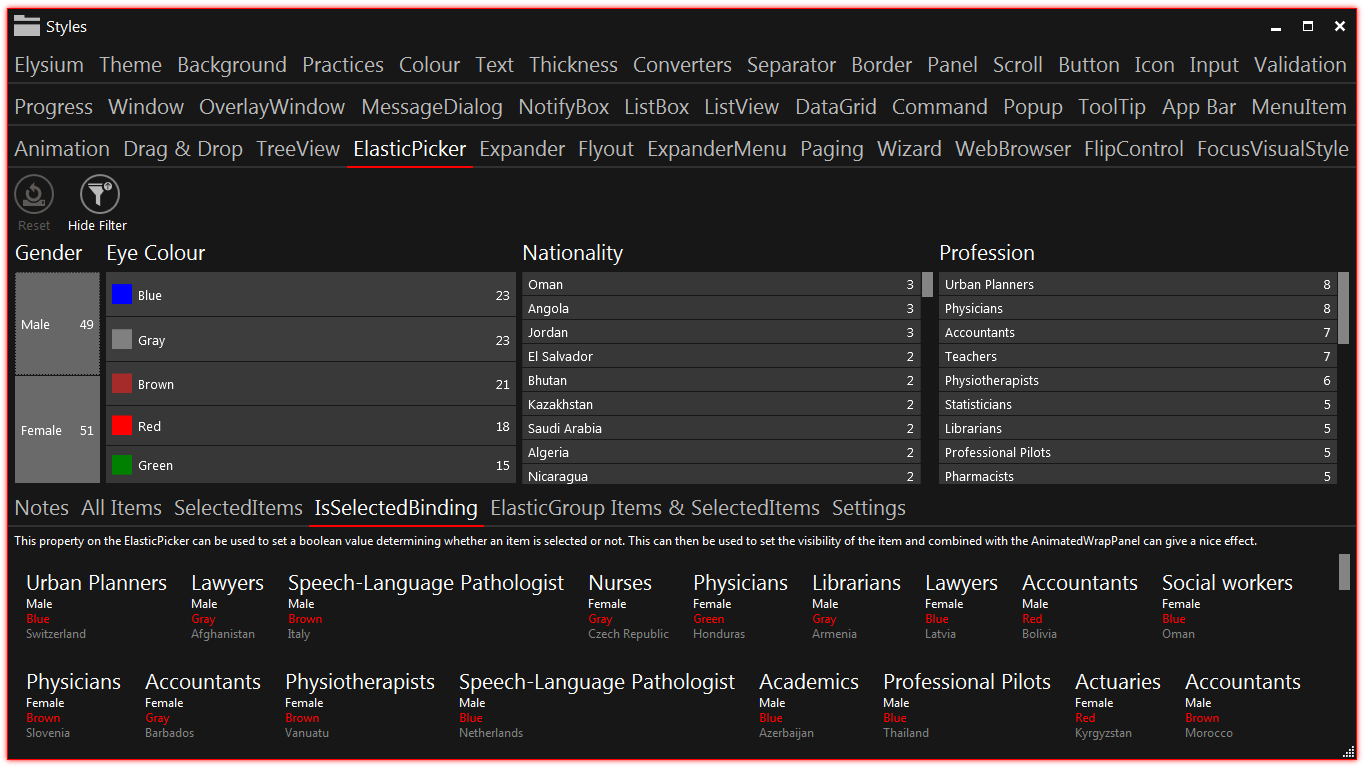
Version 1.1.4 of Elysium Extra has just been released! If you've never heard of it, Elysium Extra is a Windows Presentation Foundation (WPF) SDK which provides a wide variety of controls and styles. Here are the relevant links to get started with the project:
- [Review](https://rehansaeed.com/wpf-metro-part4-elysium-extra/) - A comprehensive review of the controls and styles available.
- [GitHub](https://github.com/RehanSaeed/Elysium-Extra) - The home of the Elysium Extra project. Hosted on GitHub. Submit issues, ask questions and view source code.
- [Getting Started](https://github.com/RehanSaeed/Elysium-Extra) - A quick start guide to using Elysium Extra in your WPF project.
- [NuGet](https://www.nuget.org/packages/Elysium.Extra) - The Elysium Extra NuGet package link.

At the time of writing the NuGet package has been downloaded **900** times which is pretty exciting given that its been live for only a few months and the project had no theme support in its early life.
# Link to this sectionThe Future of WPF
WPF has not been getting a lot of love recently. You only have to trek the internet to see all the old WPF projects which have died or gone into hibernation with little or no new updates. I've also seen a lot of 'troll like' comments in Microsoft comment boards asking why no more updates for WPF have been forthcoming.
My personal opinion is that WPF is a very mature product and does not need as many new 'features'. Even still, there have been [minor updates](http://msdn.microsoft.com/en-us/library/bb613588%28v=vs.110%29.aspx) by Microsoft fairly recently as part of .NET 4.5. Let us not forget that Visual Studio is written in WPF and the technology is being maintained. There is a lot of noise being made about upstart XAML technologies like Windows Phone and Windows Store apps (I've written a few myself and they're great too) so sometimes it's easy to overlook WPF.
# Link to this sectionWhat's New
## Link to this sectionTheming Support
The latest version of Elysium Extra adds full theming support. There is now a Dark and Light theme (A bit like Windows Store Apps). You can even change the Accent and Contrast colours dynamically on the fly. I've taken a screenshot of the sample application in the Dark them with a nice red accent colour:
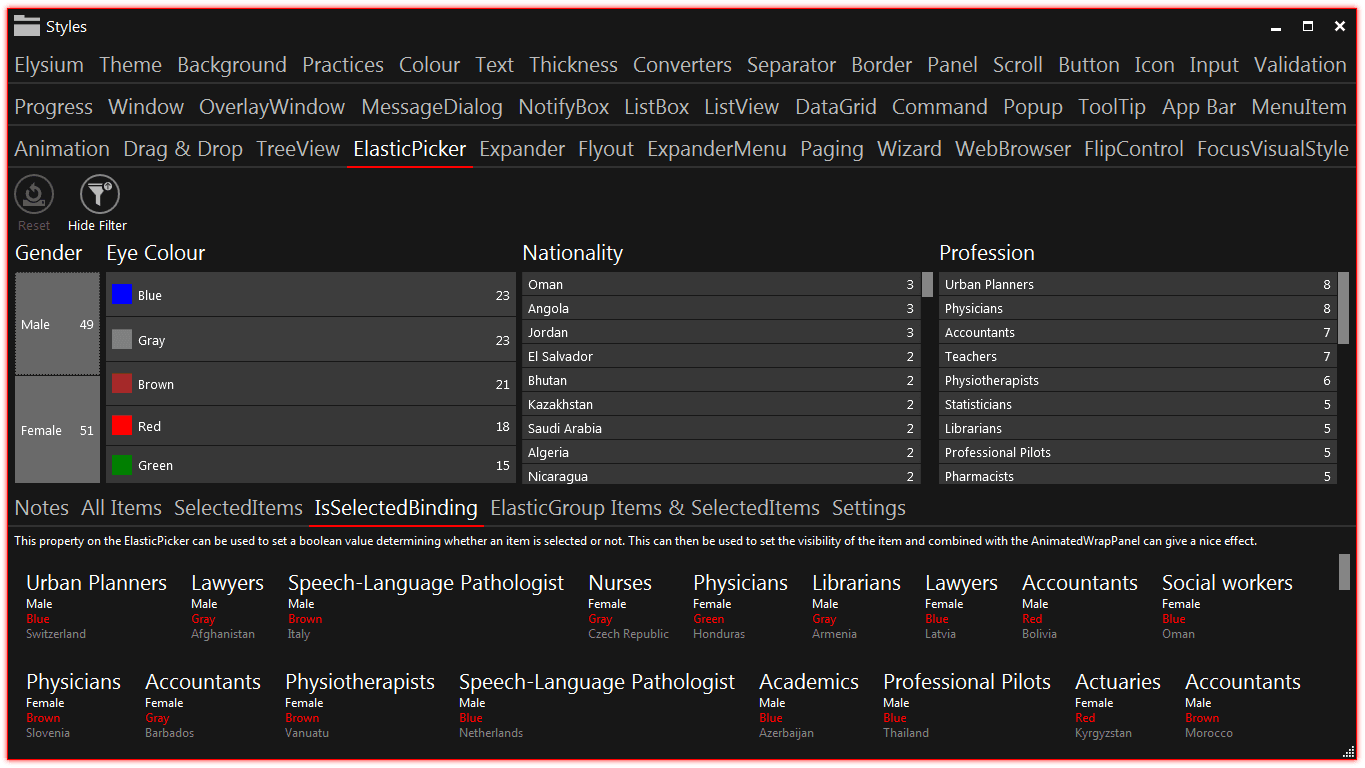
So how do you change the theme? Well you can do it in XAML by changing your App.xaml file like so:
```xml
```
In the above sample code, I'm setting the theme to dark and changing the three theme related colours. This is all totally optional of course. You can even change the theme in code behind instead like so:
```cs
public partial class App
{
public App()
{
this.Theme = Theme.Dark;
this.AccentColor = Colors.Red;
this.ContrastColor = Colors.LightBlue;
this.SemitransparentContrastColor = Colors.LightCoral;
}
}
```
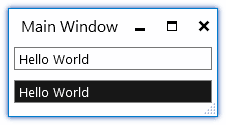
One final feature that I think is very cool is that individual controls can now have a different theme from the rest of the application. You can take a look at the example below where there are two text boxes but one of them has the theme explicitly set to Dark.
```xml
```
# Link to this sectionPerformance
In the previous version of Elysium Extra, we were making judicious use of `ResourceDictionary` merging to allow us to split up our XAML files, so that each control has it's own separate XAML file. This led to a large amount of duplication of objects in memory because the contents of various `ResourceDictionary`'s were being instantiated multiple times.
There are a few different approaches to this WPF problem. One that most library writers take (including Microsoft) is to only have a single massive XAML file containing all styles and templates. I hope you like scrolling and never being able to find anything because this is very difficult to maintain. Another approach that the original Elysium project took was to split your xaml files but then use `.tt` template files to generate a single `ResourceDictionary` which I thought was an elegant approach.
Elysium Extra has taken a different route. There is a new `SharedResourceDictionary` type which only instantiates its contents once. You can use this type yourself too in the same way you use `ResourceDictionary`. It's very useful if you are merging a dictionaries from more than one location. Here is an example take from Elysium Extra itself where we are merging two resource dictionaries:
```xml
```
# Link to this sectionWhats Next

So far, there are two contributing developers working on Elysium Extra (Myself and zsKengren who has contributed new controls which are still to be added to the library) and 22 people following the project [according to GitHub](https://github.com/RehanSaeed/Elysium-Extra). That is not nearly enough and I would like to see more community activity.
Elysium Extra is a totally open source project. You can [look at the source code](https://github.com/RehanSaeed/Elysium-Extra) and even use bits of it in your own projects freely. I occasionally get people contacting me telling me that they want to use the project or even how it has really helped them. That's great feedback and long may it continue!
## Web Mentions
[What's this?](https://en.wikipedia.org/wiki/Webmention)
### 0 Linked
### 0 Replies
## GitHub Comments
### 4 Comments
[Comment on GitHub](https://github.com/RehanSaeed/rehansaeed.github.io/issues/76)
[](https://github.com/RehanSaeed)
### [RehanSaeed](https://github.com/RehanSaeed)
Owner
12 May 2020
[](https://camo.githubusercontent.com/f51ff688aef49c040a5460469333e88c47864c8e0573ccac511852f732a9b3b9/68747470733a2f2f7777772e67726176617461722e636f6d2f6176617461722f62346134396139353761386161303463393432333361626162333765633663343f733d393626643d6d6d26723d67) **[Rico](http://rsuter.com/)** commented on **2014-11-08 16:08:05**
Small mistake: You wrote "Windows Presentation Foundation (WCF)" but it's WPF :)
[](https://github.com/RehanSaeed)
### [RehanSaeed](https://github.com/RehanSaeed)
Owner
12 May 2020
[](https://camo.githubusercontent.com/8a07049df41b8a3839a3f4342f09ea8e6e7fa0065667687f04beca2d088a1dca/68747470733a2f2f7777772e67726176617461722e636f6d2f6176617461722f32623266393030653361633066353535316462646537323864336262343935343f733d393626643d6d6d26723d67) **[Muhammad Rehan Saeed](https://rehansaeed.com/)** commented on **2014-11-08 19:19:04**
> Small mistake: You wrote "Windows Presentation Foundation (WCF)" but it's WPF :)
Thanks for that. Corrected.
[](https://github.com/RehanSaeed)
### [RehanSaeed](https://github.com/RehanSaeed)
Owner
12 May 2020
[](https://camo.githubusercontent.com/602b9f1de63daf8fe3230bc5e8f1755411cd83851accaf00d00bad6834f8f922/68747470733a2f2f7777772e67726176617461722e636f6d2f6176617461722f31373164333566626162626662666563303666663536353861333037653963373f733d393626643d6d6d26723d67) **Narasingh** commented on **2016-12-05 05:25:16**
and tell me which one is better(Modern UI for WPF, MahApps Metro, Elysium Extra ,Elysium ) to use in wpf project.. please tell me .. i want to develop wpf application with rich look and feel.
[](https://github.com/RehanSaeed)
### [RehanSaeed](https://github.com/RehanSaeed)
Owner
12 May 2020
[](https://camo.githubusercontent.com/8a07049df41b8a3839a3f4342f09ea8e6e7fa0065667687f04beca2d088a1dca/68747470733a2f2f7777772e67726176617461722e636f6d2f6176617461722f32623266393030653361633066353535316462646537323864336262343935343f733d393626643d6d6d26723d67) **[Muhammad Rehan Saeed](https://rehansaeed.com/)** commented on **2016-12-05 13:42:57**
> and tell me which one is better(Modern UI for WPF, MahApps Metro, Elysium Extra ,Elysium ) to use in wpf project.. please tell me .. i want to develop wpf application with rich look and feel.
Elysium and Elysium Extra are no longer actively maintained, not sure about Modern UI for WPF. MahApps is a good choice.
```json
{"@context":"https://schema.org","@graph":[{"@id":"https://rehansaeed.com/#website","@type":"WebSite","description":"Software Developer at Microsoft, YouTuber, Open Source Contributor and Blogger","inLanguage":"en-GB","name":"Muhammad Rehan Saeed","url":"https://rehansaeed.com/","author":{"@id":"https://rehansaeed.com/#identity"},"potentialAction":[{"@type":"SearchAction","target":{"@type":"EntryPoint","urlTemplate":"https://rehansaeed.com/?search={search_term_string}"},"query-input":"required name=search_term_string"}],"publisher":{"@id":"https://rehansaeed.com/#publisher"}},{"@id":"https://rehansaeed.com/elysium-extra-1-1-released/#webpage","@type":"WebPage","dateModified":"2014-11-05T00:00:00+00:00","datePublished":"2014-11-05T00:00:00+00:00","description":"Elysium Extra Version 1.1 is a Windows Presentation Foundation (WPF) SDK providing Metro styles for built in WPF controls and some custom controls.","name":"Elysium Extra 1.1 Released","url":"https://rehansaeed.com/elysium-extra-1-1-released/","breadcrumb":{"@id":"https://rehansaeed.com/elysium-extra-1-1-released/#breadcrumb"},"isPartOf":{"@id":"https://rehansaeed.com/#website"},"potentialAction":[{"@type":"ReadAction","target":["https://rehansaeed.com/elysium-extra-1-1-released/"]}]},{"@id":"https://rehansaeed.com/#identity","@type":"Person","name":"Muhammad Rehan Saeed","url":"https://rehansaeed.com/about/","image":{"@id":"https://rehansaeed.com/#/schema/image/1"},"sameAs":["https://github.com/RehanSaeed","https://www.linkedin.com/in/muhammad-rehan-saeed","https://stackoverflow.com/users/1212017/muhammad-rehan-saeed","https://www.youtube.com/c/MuhammadRehanSaeed","https://www.twitch.tv/rehansaeeduk"]},{"@id":"https://rehansaeed.com/#publisher","@type":"Organization","logo":"https://rehansaeed.com/images/schema/Publisher-600x60.png","name":"Muhammad Rehan Saeed","url":"https://rehansaeed.com"},{"@id":"https://rehansaeed.com/elysium-extra-1-1-released/#article","@type":"Article","dateModified":"2014-11-05T00:00:00+00:00","datePublished":"2014-11-05T00:00:00+00:00","description":"Elysium Extra Version 1.1 is a Windows Presentation Foundation (WPF) SDK providing Metro styles for built in WPF controls and some custom controls.","headline":"Elysium Extra 1.1 Released","inLanguage":"en-GB","url":"https://rehansaeed.com/elysium-extra-1-1-released/","author":{"@id":"https://rehansaeed.com/#identity"},"image":[{"@type":"ImageObject","url":"https://rehansaeed.com/images/hero/Elysium-Extra-1366x768.png","caption":"Elysium Extra","width":"1366","height":"768"}],"isPartOf":{"@id":"https://rehansaeed.com/elysium-extra-1-1-released/#webpage"},"keywords":[".NET","C#","Elysium","Elysium Extra","Metro","Modern","UI","User Interface","Windows Presentation Foundation","WPF"],"mainEntityOfPage":{"@id":"https://rehansaeed.com/elysium-extra-1-1-released/#webpage"},"publisher":{"@id":"https://rehansaeed.com/#publisher"}},{"@id":"https://rehansaeed.com/elysium-extra-1-1-released/#breadcrumb","@type":"BreadcrumbList","itemListElement":[{"@type":"ListItem","name":"Blog","item":"https://rehansaeed.com/","position":1},{"@type":"ListItem","name":"Elysium Extra 1.1 Released","item":"https://rehansaeed.com/elysium-extra-1-1-released/","position":2}]},{"@id":"https://rehansaeed.com/#/schema/image/1","@type":"ImageObject","contentUrl":"https://rehansaeed.com/images/author/Muhammad-Rehan-Saeed/Logo-512x512.png","inLanguage":"en-GB","url":"https://rehansaeed.com/images/author/Muhammad-Rehan-Saeed/Logo-512x512.png"}]}
```
## Sitemap
See the full [sitemap](https://rehansaeed.com/sitemap.md) for all pages.