---
title: "Cleaning Up CSPROJ - Muhammad Rehan Saeed"
description: "I show how to make the new Visual Studio 2017 .NET Core based csproj XML concise and pretty for hand editing."
canonical_url: "https://rehansaeed.com/cleaning-up-csproj/"
last_updated: "2017-03-18T00:00:00+00:00"
meta:
author: "Muhammad Rehan Saeed"
keywords: ".NET,.NET Core,csproj,MSBuild,project.json,SDK,Visual Studio 2017,xproj"
"og:description": "I show how to make the new Visual Studio 2017 .NET Core based csproj XML concise and pretty for hand editing."
"og:image": "https://rehansaeed.com/_og/s/o_5ec222925929ee30.png"
"og:image:alt": "Cleaning Up CSPROJ - Muhammad Rehan Saeed"
"og:image:height": "630"
"og:image:type": image/png
"og:image:width": "1200"
"og:title": "Cleaning Up CSPROJ"
"twitter:image": "https://rehansaeed.com/_og/s/o_5ec222925929ee30.png"
"twitter:image:alt": "Cleaning Up CSPROJ - Muhammad Rehan Saeed"
---
> Index of every page on this site: [llms.txt](https://rehansaeed.com/llms.txt)
# [Cleaning Up CSPROJ](https://rehansaeed.com/cleaning-up-csproj/)
Posted 18 March 2017 - **7 min read**

TLDR
I show how to make `csproj` XML concise and pretty for hand editing.
I used `project.json` since Beta 7 and got used to hand editing it, I've continues that practice with `.csproj` files and I think you should too. Recent version of Visual Studio have made a lot of performance improvements but it's still a lot slower than hand editing a text file.
The NuGet package screen in Visual Studio is achingly slow. Bulk editing takes seconds. I can update NuGet package references, package properties etc. all in one go, rather than visiting multiple disparate UI's in Visual Studio. Finally, I create new projects by copying and pasting an existing `csproj` and tweaking it. Much faster than Visual Studio's New Project dialogue.
# Install Project File Tools Link to this section
The [Project File Tools](https://marketplace.visualstudio.com/items?itemName=ms-madsk.ProjectFileTools) Visual Studio extension gives you intellisense for NuGet packages in the new `csproj` projects. Unfortunately, due to MSBuild being around for so long and being so complex, intellisense for the rest of the project XML consists of a massive list of possible properties so it becomes less useful than it was in `project.json`.
# dotnet migrate - Wow that's ugly! Link to this section
After migrating my `project.json` projects to `csproj` using Visual Studio 2017 (You could also use the `dotnet migrate` command), I found that that the XML generated was pretty ugly and contained superfluous elements you just didn't need. Here is an example `csproj` library project straight after migration:
```xml
...
Copyright © Muhammad Rehan Saeed. All rights Reserved
Dotnet Boxed Framework
2.2.2
Muhammad Rehan Saeed (RehanSaeed.com)
netstandard1.6;net461
true
true
Boxed.AspNetCore
../../../Key.snk
true
true
Boxed.AspNetCore
ASP.NET;ASP.NET Core;MVC;Boxed;Muhammad Rehan Saeed;Framework
Updated to ASP.NET Core 1.1.2.
https://raw.githubusercontent.com/Dotnet-Boxed/Framework/main/Images/Icon.png
https://github.com/Dotnet-Boxed/Framework
https://github.com/Dotnet-Boxed/Framework/blob/main/LICENSE
true
git
https://github.com/Dotnet-Boxed/Framework.git
false
false
false
All
```
## Understanding new csproj Projects Link to this section
The top of the project contains a new SDK property. This imports some MSBuild targets and props files in your `dotnet` installation folder shown below:
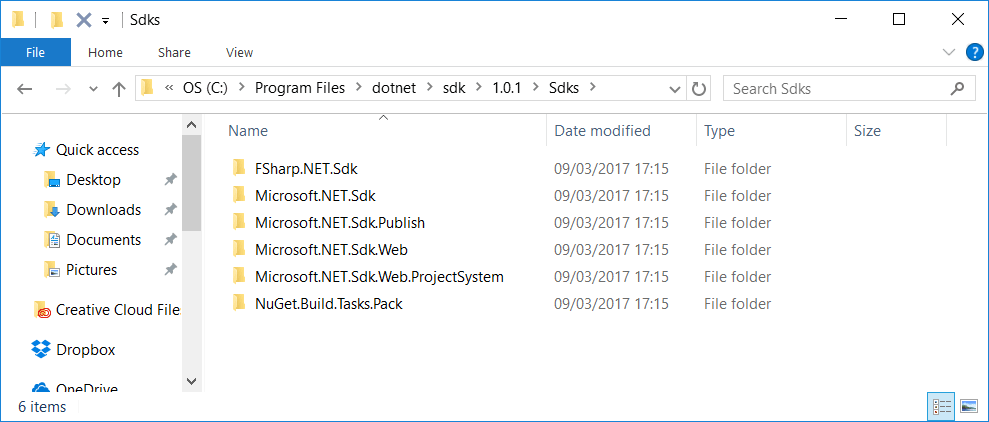
If you root around in those files, you can find defaults for all kinds of settings. Here are some of the nuggets I discovered about the web projects:
- The `NETStandard.Library` version `1.6.1` NuGet package is referenced for you by default.
- The `wwwroot` folder is excluded from compilation but included in the published output.
- `web.config`, `.cshtml` and `.json` files are published by default.
- Server garbage collection is turned on by default using the `ServerGarbageCollection` setting.
- `PreserveCompilationContext` is set to true by default.
- `node_modules`, `jspm_packages` and `bower_components` are excluded by default.
## AssemblyInfo.cs is Partially Dead Link to this section
You don't need `AssemblyInfo.cs` anymore by default as the `csproj` Package settings also set many of the assembly attributes. In fact, you didn't really need it with `project.json` either but the default templates mostly included it for some reason. However, I still found I needed to resurrect it in some cases to use the `InternalsVisibleTo` attribute. `InternalsVisibleTo` allows my unit test projects to access internal members in my library project. After a `dotnet migrate`, you may see the following elements which stop certain assembly attributes from being generated. You can safely delete these.
```xml
false
false
false
```
## Remove System.\* References Link to this section
You no longer need to explicitly reference `System.*` references in your `csproj`. David Fowler recommends that you always reference the `NETStandard.Library` meta NuGet package gives you most `System.*` references. You get `NETStandard.Library` by default if you use the SDK attribute at the top of the `csproj`:
```xml
```
This meant that I could remove the entire code block below except `System.ServiceModel` because that reference is not given to you by the `NETStandard.Library` NuGet package.
```xml
```
## Turn Elements into Attributes Link to this section
For some reason dotnet migrate produces overly verbose XML in some cases by outputting XML elements instead of attributes. I have a NuGet reference to `StyleCop.Analyzers` which is a build time dependency and I don't want it to be output to my bin directory. You do this by setting the `PrivateAssets` property but you can turn this:
```xml
All
```
Into this:
```xml
```
## Label your Sections Link to this section
You can label your `PropertyGroup` and `ItemGroup` elements using the `Label` attribute:
```xml
```
So the question becomes, how should we label them? Well, the convention I use is to use the same label names as the ones in Visual Studio's project properties screen:
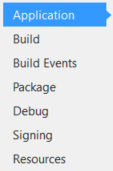
# The End Result Link to this section
This is what my `csproj` looks like at the end of all that. I've removed all the extra fluff you don't need and labelled the properties in a way that makes navigating the file with your eye that much quicker.
```xml
netstandard1.6;net461
true
true
../../../MinimumRecommendedRulesWithStyleCop.ruleset
2.2.2
Muhammad Rehan Saeed (RehanSaeed.com)
Dotnet Boxed Framework
...
Copyright © Muhammad Rehan Saeed. All rights Reserved
true
https://github.com/Dotnet-Boxed/Framework/blob/main/LICENSE
https://github.com/Dotnet-Boxed/Framework
https://raw.githubusercontent.com/Dotnet-Boxed/Framework/main/Images/Icon.png
https://github.com/Dotnet-Boxed/Framework.git
git
ASP.NET;ASP.NET Core;MVC;Boxed;Muhammad Rehan Saeed;Framework
Updated to ASP.NET Core 1.1.2.
true
../../../Key.snk
true
```
## Web Mentions
[What's this?](https://en.wikipedia.org/wiki/Webmention)
### 0 Linked
### 0 Replies
## GitHub Comments
### 1 Comment
[Comment on GitHub](https://github.com/RehanSaeed/rehansaeed.github.io/issues/63)
[](https://github.com/RehanSaeed)
### [RehanSaeed](https://github.com/RehanSaeed)
Owner
12 May 2020
[](https://camo.githubusercontent.com/141960ae1a61d2bdea9db6bd41010cc414ac0e6d4ef20319a597d3a4bc3dae87/68747470733a2f2f7777772e67726176617461722e636f6d2f6176617461722f34346537653061333434646634313531636261333564306462626464346261613f733d393626643d6d6d26723d67) **nemke** commented on **2017-09-16 15:27:06**
You do not need to keep `AssemblyInfo` class for `InternalsVisibleTo`. This can be achieved in `*.csproj` with the following code:
`FriendlyClassName`
```json
{"@context":"https://schema.org","@graph":[{"@id":"https://rehansaeed.com/#website","@type":"WebSite","description":"Software Developer at Microsoft, YouTuber, Open Source Contributor and Blogger","inLanguage":"en-GB","name":"Muhammad Rehan Saeed","url":"https://rehansaeed.com/","author":{"@id":"https://rehansaeed.com/#identity"},"potentialAction":[{"@type":"SearchAction","target":{"@type":"EntryPoint","urlTemplate":"https://rehansaeed.com/?search={search_term_string}"},"query-input":"required name=search_term_string"}],"publisher":{"@id":"https://rehansaeed.com/#publisher"}},{"@id":"https://rehansaeed.com/cleaning-up-csproj/#webpage","@type":"WebPage","dateModified":"2017-03-18T00:00:00+00:00","datePublished":"2017-03-18T00:00:00+00:00","description":"I show how to make the new Visual Studio 2017 .NET Core based csproj XML concise and pretty for hand editing.","name":"Cleaning Up CSPROJ","url":"https://rehansaeed.com/cleaning-up-csproj/","breadcrumb":{"@id":"https://rehansaeed.com/cleaning-up-csproj/#breadcrumb"},"isPartOf":{"@id":"https://rehansaeed.com/#website"},"potentialAction":[{"@type":"ReadAction","target":["https://rehansaeed.com/cleaning-up-csproj/"]}]},{"@id":"https://rehansaeed.com/#identity","@type":"Person","name":"Muhammad Rehan Saeed","url":"https://rehansaeed.com/about/","image":{"@id":"https://rehansaeed.com/#/schema/image/1"},"sameAs":["https://github.com/RehanSaeed","https://www.linkedin.com/in/muhammad-rehan-saeed","https://stackoverflow.com/users/1212017/muhammad-rehan-saeed","https://www.youtube.com/c/MuhammadRehanSaeed","https://www.twitch.tv/rehansaeeduk"]},{"@id":"https://rehansaeed.com/#publisher","@type":"Organization","logo":"https://rehansaeed.com/images/schema/Publisher-600x60.png","name":"Muhammad Rehan Saeed","url":"https://rehansaeed.com"},{"@id":"https://rehansaeed.com/cleaning-up-csproj/#article","@type":"Article","dateModified":"2017-03-18T00:00:00+00:00","datePublished":"2017-03-18T00:00:00+00:00","description":"I show how to make the new Visual Studio 2017 .NET Core based csproj XML concise and pretty for hand editing.","headline":"Cleaning Up CSPROJ","inLanguage":"en-GB","url":"https://rehansaeed.com/cleaning-up-csproj/","author":{"@id":"https://rehansaeed.com/#identity"},"image":[{"@type":"ImageObject","url":"https://rehansaeed.com/images/hero/Cleaning-Up-CSPROJ-1366x768.png","caption":"Cleaning Up-CSPROJ","width":"1366","height":"768"}],"isPartOf":{"@id":"https://rehansaeed.com/cleaning-up-csproj/#webpage"},"keywords":[".NET",".NET Core","csproj","MSBuild","project.json","SDK","Visual Studio 2017","xproj"],"mainEntityOfPage":{"@id":"https://rehansaeed.com/cleaning-up-csproj/#webpage"},"publisher":{"@id":"https://rehansaeed.com/#publisher"}},{"@id":"https://rehansaeed.com/cleaning-up-csproj/#breadcrumb","@type":"BreadcrumbList","itemListElement":[{"@type":"ListItem","name":"Blog","item":"https://rehansaeed.com/","position":1},{"@type":"ListItem","name":"Cleaning Up CSPROJ","item":"https://rehansaeed.com/cleaning-up-csproj/","position":2}]},{"@id":"https://rehansaeed.com/#/schema/image/1","@type":"ImageObject","contentUrl":"https://rehansaeed.com/images/author/Muhammad-Rehan-Saeed/Logo-512x512.png","inLanguage":"en-GB","url":"https://rehansaeed.com/images/author/Muhammad-Rehan-Saeed/Logo-512x512.png"}]}
```
## Sitemap
See the full [sitemap](https://rehansaeed.com/sitemap.md) for all pages.