---
title: "Canonical URL's for ASP.NET MVC - Muhammad Rehan Saeed"
description: "Use canonical URL's in ASP.NET MVC for better Search Engine Optimization (SEO) using ASP.NET Core Boilerplate and the RedirectToCanonicalUrlAttribute."
canonical_url: "https://rehansaeed.com/canonical-urls-for-asp-net-mvc/"
last_updated: "2015-07-14T00:00:00+00:00"
meta:
author: "Muhammad Rehan Saeed"
keywords: ".NET,ASP.NET Core,ASP.NET MVC,ASP.NET Core Boilerplate,C#,Search Engine Optimization (SEO)"
"og:description": "Use canonical URL's in ASP.NET MVC for better Search Engine Optimization (SEO) using ASP.NET Core Boilerplate and the RedirectToCanonicalUrlAttribute."
"og:image": "https://rehansaeed.com/_og/s/o_c91fadf7bcfc8064.png"
"og:image:alt": "Canonical URL's for ASP.NET MVC - Muhammad Rehan Saeed"
"og:image:height": "630"
"og:image:type": image/png
"og:image:width": "1200"
"og:title": "Canonical URL's for ASP.NET MVC"
"twitter:image": "https://rehansaeed.com/_og/s/o_c91fadf7bcfc8064.png"
"twitter:image:alt": "Canonical URL's for ASP.NET MVC - Muhammad Rehan Saeed"
---
> Index of every page on this site: [llms.txt](https://rehansaeed.com/llms.txt)
# [Canonical URL's for ASP.NET MVC](https://rehansaeed.com/canonical-urls-for-asp-net-mvc/)
Posted 14 July 2015 - **11 min read**
- [ASP.NET Core Boilerplate](https://rehansaeed.com/asp-net-mvc-boilerplate/)
- Security
- [Securing the ASP.NET MVC Web.config (Updated)](https://rehansaeed.com/securing-the-aspnet-mvc-web-config/)
- [NWebSec ASP.NET MVC Security Through HTTP Headers](https://rehansaeed.com/nwebsec-asp-net-mvc-security-through-http-headers/)
- [Content Security Policy (CSP) for ASP.NET MVC](https://rehansaeed.com/content-security-policy-for-asp-net-mvc/)
- Search Engine Optimization (SEO)
- [Canonical URL's for ASP.NET MVC](https://rehansaeed.com/canonical-urls-for-asp-net-mvc/)
- [Dynamically Generating Robots.txt Using ASP.NET MVC](https://rehansaeed.com/dynamically-generating-robots-txt-using-asp-net-mvc/)
- [Internet Favicon Madness (Updated)](https://rehansaeed.com/internet-favicon-madness/)
- [Building RSS/Atom Feeds for ASP.NET MVC](https://rehansaeed.com/building-rssatom-feeds-for-asp-net-mvc/)
The aim of this post is to give your site better search engine rankings using special [Search Engine Optimization (SEO)](https://en.wikipedia.org/wiki/Search_engine_optimization) techniques. Take a look at the URL's below and see if you can spot the differences between them:
1. http://example.com/one/two/
2. https://example.com/one/two/
3. http://example.com/one/two
4. http://example.com/One/Two
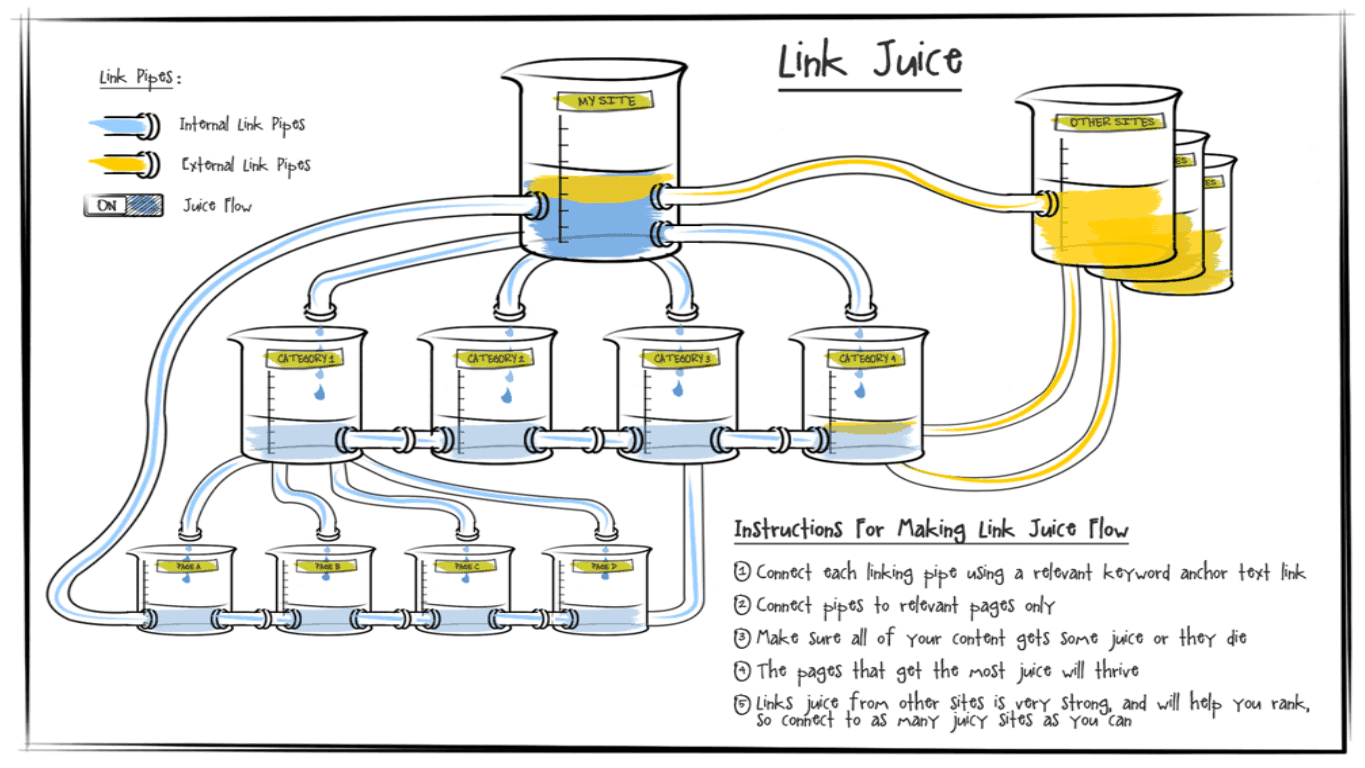
The second one has a HTTPS scheme, the third omits the trailing slash and the fourth has mixed case characters. All of the URL's point to the same resource but it turns out that search engines treat every one of these URL's as unique and different. Search engines give each URL a page rank, which determines where the resource will show up in the search results. Another term you will also hear quite often is 'link juice'. The link juice conceptualizes how page rank flows between pages and websites.
If your site exposes the above four different URL's to the single resource, your link juice is being spread against each one and as a result, that will be having a detrimental impact on your page rank.
# The Canonical Link Tag Link to this section
One way to solve this problem is to add a canonical link tag to the head of your HTML page. This tells search engines what the canonical (actual) URL to the page is. The link tag contains a URL to your preferred URL for the page.
```html
```
One thing you must decide early on is your preferred URL for every page. You must ask yourself the following questions and use the resulting URL in your canonical link tag.
1. Do I prefer this page to be HTTP or HTTPS? This is yet another reason to go with HTTPS across your entire site.
2. Should the URL end with a trailing slash? This is often preferred over omitting it but it's a matter of preference.
3. Should I allow a mix of upper-case and lower-case characters? Most sites choose to go with all lower-case characters.
When search engines follow a link to your page, regardless of which URL they followed to get to your page, all of the link juice will be given to the URL specified in your canonical link tag. Google goes into a lot more depth about this tag [here](http://googlewebmastercentral.blogspot.co.uk/2009/02/specify-your-canonical.html).
# 301 Permanent Redirects Link to this section
Unfortunately, using the canonical link tag is not the recommended approach. The intention is that it should only be used to retrofit older websites, so they can become optimized for search engines.
According to both [Google](http://googlewebmastercentral.blogspot.co.uk/2010/04/to-slash-or-not-to-slash.html) and [Bing](http://blogs.bing.com/webmaster/2012/01/26/moving-content-think-301-not-relcanonical), the recommended approach if you visit a non-preferred format of your pages URL is to perform a [301 permanent redirect](https://moz.com/learn/seo/redirection) to the preferred canonical URL. According to them, you only lose a tiny amount of link juice by doing a 301 permanent redirect.
# Canonical URL's in MVC Link to this section
ASP.NET MVC 5 and ASP.NET Core have two settings you can use to automatically create canonical URL's every time you generate URL's.
```cs
// Append a trailing slash to all URL's.
RouteTable.Routes.AppendTrailingSlash = true;
// Ensure that all URL's are lower-case.
RouteTable.Routes.LowercaseUrls = true;
```
```cs
services.ConfigureRouting(
routeOptions =>
{
// Append a trailing slash to all URL's.
routeOptions.AppendTrailingSlash = true;
// Ensure that all URL's are lower-case.
routeOptions.LowercaseUrls = true;
});
```
Once you apply these settings and are using the `UrlHelper` to generate all your URL's, you will see that across your site all URL's are lower-case and all end with a trailing slash (This is just my personal preference you may not like trailing slashes).
This means that within your site, no 301 permanent redirects to canonical URL's are required because the URL's are already canonical. However, this just solves part of the problem. What about external links to your site? What happens when people copy and paste your site and delete or add a trailing slash? What happens when someone types in a link to your site and puts in an upper-case character? The fact is you have no control over external links and when search engine crawlers follow those non-canonical links you will be losing valuable link juice.
# 301 Permanent Redirects in MVC Link to this section
Enter the `RedirectToCanonicalUrlAttribute`. This is an MVC filter you can apply, which will check that the URL from each request is canonical. If it is, it does nothing and MVC returns the view in its response as normal. If the URL is not canonical, it generates the canonical URL based on the above MVC settings and returns a 301 permanent redirect response to the client. The client can then make another request to the correct canonical URL.
You can take a look at the source code for the `RedirectToCanonicalUrlAttribute`, `NoTrailingSlashAttribute` and `NoLowercaseQueryStringAttribute`'s (I shall explain in a minute) for MVC 5 below or the ASP.NET Core version [here](https://github.com/Dotnet-Boxed/Framework).
```cs
///
/// To improve Search Engine Optimization SEO, there should only be a single URL for each resource. Case
/// differences and/or URL's with/without trailing slashes are treated as different URL's by search engines. This
/// filter redirects all non-canonical URL's based on the settings specified to their canonical equivalent.
/// Note: Non-canonical URL's are not generated by this site template, it is usually external sites which are
/// linking to your site but have changed the URL case or added/removed trailing slashes.
/// (See Google's comments at http://googlewebmastercentral.blogspot.co.uk/2010/04/to-slash-or-not-to-slash.html
/// and Bing's at http://blogs.bing.com/webmaster/2012/01/26/moving-content-think-301-not-relcanonical).
///
[AttributeUsage(AttributeTargets.Method | AttributeTargets.Class, Inherited = true, AllowMultiple = false)]
public class RedirectToCanonicalUrlAttribute : FilterAttribute, IAuthorizationFilter
{
private const char QueryCharacter = '?';
private const char SlashCharacter = '/';
private readonly bool appendTrailingSlash;
private readonly bool lowercaseUrls;
///
/// Initializes a new instance of the class.
///
/// If set to true append trailing slashes, otherwise strip trailing
/// slashes.
/// If set to true lower-case all URL's.
public RedirectToCanonicalUrlAttribute(
bool appendTrailingSlash,
bool lowercaseUrls)
{
this.appendTrailingSlash = appendTrailingSlash;
this.lowercaseUrls = lowercaseUrls;
}
///
/// Gets a value indicating whether to append trailing slashes.
///
///
/// true if appending trailing slashes; otherwise, strip trailing slashes.
///
public bool AppendTrailingSlash
{
get { return this.appendTrailingSlash; }
}
///
/// Gets a value indicating whether to lower-case all URL's.
///
///
/// true if lower-casing URL's; otherwise, false.
///
public bool LowercaseUrls
{
get { return this.lowercaseUrls; }
}
///
/// Determines whether the HTTP request contains a non-canonical URL using ,
/// if it doesn't calls the method.
///
/// An object that encapsulates information that is required in order to use the
/// attribute.
/// The parameter is null.
public virtual void OnAuthorization(AuthorizationContext filterContext)
{
if (filterContext == null)
{
throw new ArgumentNullException(nameof(filterContext));
}
if (string.Equals(filterContext.HttpContext.Request.HttpMethod, "GET", StringComparison.Ordinal))
{
string canonicalUrl;
if (!this.TryGetCanonicalUrl(filterContext, out canonicalUrl))
{
this.HandleNonCanonicalRequest(filterContext, canonicalUrl);
}
}
}
///
/// Determines whether the specified URl is canonical and if it is not, outputs the canonical URL.
///
/// An object that encapsulates information that is required in order to use the
/// attribute.
/// The canonical URL.
/// true if the URL is canonical, otherwise false.
protected virtual bool TryGetCanonicalUrl(AuthorizationContext filterContext, out string canonicalUrl)
{
bool isCanonical = true;
Uri url = filterContext.HttpContext.Request.Url;
canonicalUrl = url.ToString();
int queryIndex = canonicalUrl.IndexOf(QueryCharacter);
// If we are not dealing with the home page. Note, the home page is a special case and it doesn't matter
// if there is a trailing slash or not. Both will be treated as the same by search engines.
if (url.AbsolutePath.Length > 1)
{
if (queryIndex == -1)
{
bool hasTrailingSlash = canonicalUrl[canonicalUrl.Length - 1] == SlashCharacter;
if (this.appendTrailingSlash)
{
// Append a trailing slash to the end of the URL.
if (!hasTrailingSlash && !this.HasNoTrailingSlashAttribute(filterContext))
{
canonicalUrl += SlashCharacter;
isCanonical = false;
}
}
else
{
// Trim a trailing slash from the end of the URL.
if (hasTrailingSlash)
{
canonicalUrl = canonicalUrl.TrimEnd(SlashCharacter);
isCanonical = false;
}
}
}
else
{
bool hasTrailingSlash = canonicalUrl[queryIndex - 1] == SlashCharacter;
if (this.appendTrailingSlash)
{
// Append a trailing slash to the end of the URL but before the query string.
if (!hasTrailingSlash && !this.HasNoTrailingSlashAttribute(filterContext))
{
canonicalUrl = canonicalUrl.Insert(queryIndex, SlashCharacter.ToString());
isCanonical = false;
}
}
else
{
// Trim a trailing slash to the end of the URL but before the query string.
if (hasTrailingSlash)
{
canonicalUrl = canonicalUrl.Remove(queryIndex - 1, 1);
isCanonical = false;
}
}
}
}
if (this.lowercaseUrls)
{
foreach (char character in canonicalUrl)
{
if (this.HasNoLowercaseQueryStringAttribute(filterContext) && queryIndex != -1)
{
if (character == QueryCharacter)
{
break;
}
if (char.IsUpper(character) && !this.HasNoTrailingSlashAttribute(filterContext))
{
canonicalUrl = canonicalUrl.Substring(0, queryIndex).ToLower() +
canonicalUrl.Substring(queryIndex, canonicalUrl.Length - queryIndex);
isCanonical = false;
break;
}
}
else
{
if (char.IsUpper(character) && !this.HasNoTrailingSlashAttribute(filterContext))
{
canonicalUrl = canonicalUrl.ToLower();
isCanonical = false;
break;
}
}
}
}
return isCanonical;
}
///
/// Handles HTTP requests for URL's that are not canonical. Performs a 301 Permanent Redirect to the canonical URL.
///
/// An object that encapsulates information that is required in order to use the
/// attribute.
/// The canonical URL.
protected virtual void HandleNonCanonicalRequest(AuthorizationContext filterContext, string canonicalUrl)
{
filterContext.Result = new RedirectResult(canonicalUrl, true);
}
///
/// Determines whether the specified action or its controller has the
/// attribute specified.
///
/// The filter context.
/// true if a attribute is specified, otherwise
/// false.
protected virtual bool HasNoTrailingSlashAttribute(AuthorizationContext filterContext)
{
return filterContext.ActionDescriptor.IsDefined(typeof(NoTrailingSlashAttribute), false) ||
filterContext.ActionDescriptor.ControllerDescriptor.IsDefined(typeof(NoTrailingSlashAttribute), false);
}
///
/// Determines whether the specified action or its controller has the
/// attribute specified.
///
/// The filter context.
/// true if a attribute is specified, otherwise
/// false.
protected virtual bool HasNoLowercaseQueryStringAttribute(AuthorizationContext filterContext)
{
return filterContext.ActionDescriptor.IsDefined(typeof(NoLowercaseQueryStringAttribute), false) ||
filterContext.ActionDescriptor.ControllerDescriptor.IsDefined(typeof(NoLowercaseQueryStringAttribute), false);
}
}
///
/// Requires that a HTTP request does not contain a trailing slash. If it does, return a 404 Not Found. This is
/// useful if you are dynamically generating something which acts like it's a file on the web server.
/// E.g. /Robots.txt/ should not have a trailing slash and should be /Robots.txt. Note, that we also don't care if
/// it is upper-case or lower-case in this instance.
///
[AttributeUsage(AttributeTargets.Method | AttributeTargets.Class, Inherited = true, AllowMultiple = false)]
public class NoTrailingSlashAttribute : FilterAttribute, IAuthorizationFilter
{
private const char QueryCharacter = '?';
private const char SlashCharacter = '/';
///
/// Determines whether a request contains a trailing slash and, if it does, calls the
/// method.
///
/// An object that encapsulates information that is required in order to use the
/// attribute.
/// The parameter is null.
public virtual void OnAuthorization(AuthorizationContext filterContext)
{
if (filterContext == null)
{
throw new ArgumentNullException(nameof(filterContext));
}
string canonicalUrl = filterContext.HttpContext.Request.Url.ToString();
int queryIndex = canonicalUrl.IndexOf(QueryCharacter);
if (queryIndex == -1)
{
if (canonicalUrl[canonicalUrl.Length - 1] == SlashCharacter)
{
this.HandleTrailingSlashRequest(filterContext);
}
}
else
{
if (canonicalUrl[queryIndex - 1] == SlashCharacter)
{
this.HandleTrailingSlashRequest(filterContext);
}
}
}
///
/// Handles HTTP requests that have a trailing slash but are not meant to.
///
/// An object that encapsulates information that is required in order to use the
/// attribute.
protected virtual void HandleTrailingSlashRequest(AuthorizationContext filterContext)
{
filterContext.Result = new HttpNotFoundResult();
}
}
///
/// Ensures that a HTTP request URL can contain query string parameters with both upper-case and lower-case
/// characters.
///
[AttributeUsage(AttributeTargets.Method | AttributeTargets.Class, Inherited = true, AllowMultiple = false)]
public class NoLowercaseQueryStringAttribute : FilterAttribute
{
}
```
Adding the `RedirectToCanonicalUrlAttribute` filter is easy. You can add it to the global filters collection so all requests will be handled by it like so:
```cs
GlobalFilters.Filters.Add(new RedirectToCanonicalUrlAttribute(
RouteTable.Routes.AppendTrailingSlash,
RouteTable.Routes.LowercaseUrls));
```
That's it! It's as simple as that! Now there are two special cases, which is where the `NoTrailingSlashAttribute` and `NoLowercaseQueryStringAttribute` filters comes in.
## Special Case 1 Link to this section
Say you want to have the following action method where visiting `http://example.com/robots.txt` returns a text result. We want the client to think it's just visiting a static `robots.txt` file but in reality we are dynamically generating it (One reason for doing this is that a `robots.txt` file must contain an absolute URL and you want to use the `UrlHelper` to just handle that, no matter what domain the site is running under).
```cs
[NoTrailingSlash]
[Route("robots.txt")]
public ContentResult RobotsText()
{
string content = this.robotsService.GetRobotsText();
return this.Content(content, ContentType.Text, Encoding.UTF8);
}
```
Adding a trailing slash to `robots.txt` would just be weird. Also, the last thing you want to do when search engines try to visit `http://example.com/robots.txt` is 301 permanent redirect them to `http://example.com/robots.txt/`. So we add the `NoTrailingSlashAttribute` filter.
The `RedirectToCanonicalUrlAttribute` knows about the `NoTrailingSlashAttribute` filter and when it sees it and we make a request to the above action, it ignores the `AppendTrailingSlash` setting and it works just like requesting a static `robots.txt` file from the file system.
## Special Case 2 Link to this section
Sometimes you want your query string parameters to be a mix of upper-case and lower-case. When you want to do this, simply add the `NoLowercaseQueryStringAttribute` attribute to the action method like so:
```cs
[NoLowercaseQueryString]
[Route("action")]
public void Action(string mixedCaseParameter)
{
// mixedCaseParameter can contain upper and lower case characters.
}
```
If you are using the ASP.NET Identity NuGet package for authentication, then take note, you need to apply the `NoLowercaseQueryStringAttribute` to the `AccountController`.
# Conclusions Link to this section
Once again, you can find a working example of this and much more using the [ASP.NET Core Boilerplate](https://visualstudiogallery.msdn.microsoft.com/6cf50a48-fc1e-4eaf-9e82-0b2a6705ca7d) project template or view the source code directly on [GitHub](https://github.com/Dotnet-Boxed/Framework).
## Web Mentions
[What's this?](https://en.wikipedia.org/wiki/Webmention)
### 0 Linked
### 0 Replies
## GitHub Comments
### 17 Comments
[Comment on GitHub](https://github.com/RehanSaeed/rehansaeed.github.io/issues/62)
[](https://github.com/RehanSaeed)
### [RehanSaeed](https://github.com/RehanSaeed)
Owner
12 May 2020
[](https://camo.githubusercontent.com/0b56d5256f8b88bb7c643ffadd1494c97613a9f47ece407fd5261d7a72126121/68747470733a2f2f7777772e67726176617461722e636f6d2f6176617461722f30336339383031383737376362653436366635326666653334666239633937363f733d393626643d6d6d26723d67) **[Jasvinder](http://checkpnrstatusonly.com/)** commented on **2016-01-06 12:00:15**
URL Canonicalization seems to be quite new topic to me, being a newbie. Although, I have read some guides, but still i have one confusion, Do I need to add URL Canonical Tag in every page of my site?
[](https://github.com/RehanSaeed)
### [RehanSaeed](https://github.com/RehanSaeed)
Owner
12 May 2020
[](https://camo.githubusercontent.com/8a07049df41b8a3839a3f4342f09ea8e6e7fa0065667687f04beca2d088a1dca/68747470733a2f2f7777772e67726176617461722e636f6d2f6176617461722f32623266393030653361633066353535316462646537323864336262343935343f733d393626643d6d6d26723d67) **[Muhammad Rehan Saeed](https://rehansaeed.com/)** commented on **2016-01-07 16:27:18**
> URL Canonicalization seems to be quite new topic to me, being a newbie. Although, I have read some guides, but still i have one confusion, Do I need to add URL Canonical Tag in every page of my site?
It's just a filter, so you can if you want to. The main idea of it though is to put it at the root and then use the NoTrailingSlashAttribute or `NoLowercaseQueryStringAttribute` to tweak how it works when you have an exception to the rule.
[](https://github.com/RehanSaeed)
### [RehanSaeed](https://github.com/RehanSaeed)
Owner
12 May 2020
[](https://camo.githubusercontent.com/936ec96928637419ff844351946ebe2eac691fa6e5c96aafe9eb60e298e3a751/68747470733a2f2f7777772e67726176617461722e636f6d2f6176617461722f32646438656136623061356366623238323165333361356666653136643332653f733d393626643d6d6d26723d67) **Tiger** commented on **2016-05-15 21:44:43**
Fantastic post - great that you shown options in mvc5 and mvc6
[](https://github.com/RehanSaeed)
### [RehanSaeed](https://github.com/RehanSaeed)
Owner
12 May 2020
[](https://camo.githubusercontent.com/cfdc9cc47ec29c594789064be9a28e0c1483c97b0ead437933c209e1f41e4c64/68747470733a2f2f7777772e67726176617461722e636f6d2f6176617461722f39626263343135326139616561323339373938373366383765633662343530663f733d393626643d6d6d26723d67) **[Doron Grinzaig](https://yooocan.com/)** commented on **2016-10-08 21:11:29**
Hi Rehan,
I follow many of your post and work, great job man! thanks for helping the community!
Curious to know if you have something to automate things like these:
```
[Route("TermsOfUse", Name= "TermsOfUse")]
[Route("Home/TermsOfUse", Name = "HomeTermsOfUse")]
public ActionResult TermsOfUse()
{
if (Request.GetDisplayUrl().Contains("/Home"))
return RedirectToRoutePermanent("TermsOfUse");
return View();
}
[Route("Privacy", Name= "Privacy")]
[Route("Home/Privacy", Name= "HomePrivacy")]
public ActionResult Privacy()
{
if (Request.GetDisplayUrl().Contains("/Home"))
return RedirectToRoutePermanent("Privacy");
return View();
}
```
[](https://github.com/RehanSaeed)
### [RehanSaeed](https://github.com/RehanSaeed)
Owner
12 May 2020
[](https://camo.githubusercontent.com/8a07049df41b8a3839a3f4342f09ea8e6e7fa0065667687f04beca2d088a1dca/68747470733a2f2f7777772e67726176617461722e636f6d2f6176617461722f32623266393030653361633066353535316462646537323864336262343935343f733d393626643d6d6d26723d67) **[Muhammad Rehan Saeed](https://rehansaeed.com/)** commented on **2016-10-09 11:05:01**
> Hi Rehan,
> I follow many of your post and work, great job man! thanks for helping the community!
>
> Curious to know if you have something to automate things like these:
>
> ```
> [Route("TermsOfUse", Name= "TermsOfUse")]
> [Route("Home/TermsOfUse", Name = "HomeTermsOfUse")]
> public ActionResult TermsOfUse()
> {
> if (Request.GetDisplayUrl().Contains("/Home"))
> return RedirectToRoutePermanent("TermsOfUse");
>
> return View();
> }
>
> [Route("Privacy", Name= "Privacy")]
> [Route("Home/Privacy", Name= "HomePrivacy")]
> public ActionResult Privacy()
> {
> if (Request.GetDisplayUrl().Contains("/Home"))
> return RedirectToRoutePermanent("Privacy");
>
> return View();
> }
> ```
Looks like you want to the response [Rewrite middleware](https://github.com/aspnet/BasicMiddleware/tree/dev/src/Microsoft.AspNetCore.Rewrite).
[](https://github.com/RehanSaeed)
### [RehanSaeed](https://github.com/RehanSaeed)
Owner
12 May 2020
[](https://camo.githubusercontent.com/cfdc9cc47ec29c594789064be9a28e0c1483c97b0ead437933c209e1f41e4c64/68747470733a2f2f7777772e67726176617461722e636f6d2f6176617461722f39626263343135326139616561323339373938373366383765633662343530663f733d393626643d6d6d26723d67) **[Doron Grinzaig](https://yooocan.com/)** commented on **2016-11-29 20:05:44**
> Fantastic post - great that you shown options in mvc5 and mvc6
Just got here back because of inbound links report.
First, thank you for promoting our website on your blog!
Second, I must ask, aren't you afraid it will cause spam?
Lastly, (since we had massive spam bots recently) why aren't you using recpatcha?
We got dozens of Viagra spam messages!
[](https://github.com/RehanSaeed)
### [RehanSaeed](https://github.com/RehanSaeed)
Owner
12 May 2020
[](https://camo.githubusercontent.com/cfdc9cc47ec29c594789064be9a28e0c1483c97b0ead437933c209e1f41e4c64/68747470733a2f2f7777772e67726176617461722e636f6d2f6176617461722f39626263343135326139616561323339373938373366383765633662343530663f733d393626643d6d6d26723d67) **[Doron Grinzaig](https://yooocan.com/)** commented on **2016-11-29 20:10:03**
> Looks like you want to the response [Rewrite middleware](https://github.com/aspnet/BasicMiddleware/tree/dev/src/Microsoft.AspNetCore.Rewrite).
(I accidentally replied to a wrong comment, not sure how it happened. Sorry.)
Just got here back because of inbound links report.
First, thank you for promoting our website on your blog!
Second, I must ask, aren't you afraid it will cause spam?
Lastly, (since we had massive spam bots recently) why aren't you using recpatcha?
We got dozens of Viagra spam messages!
[](https://github.com/RehanSaeed)
### [RehanSaeed](https://github.com/RehanSaeed)
Owner
12 May 2020
[](https://camo.githubusercontent.com/3b8b597359a07d47dfbe6815093603a5a478da32f6572a908bdca6bfe3d31443/68747470733a2f2f7777772e67726176617461722e636f6d2f6176617461722f30633037316131346562623635393237306163623935313638393164363735323f733d393626643d6d6d26723d67) **Sandeep** commented on **2016-12-01 05:45:15**
http://example.com/ and http://www.example.com/ should resolve to the same URL, but currently do not. please help me how to solve this error..(mvc 4 application)
[](https://github.com/RehanSaeed)
### [RehanSaeed](https://github.com/RehanSaeed)
Owner
12 May 2020
[](https://camo.githubusercontent.com/8a07049df41b8a3839a3f4342f09ea8e6e7fa0065667687f04beca2d088a1dca/68747470733a2f2f7777772e67726176617461722e636f6d2f6176617461722f32623266393030653361633066353535316462646537323864336262343935343f733d393626643d6d6d26723d67) **[Muhammad Rehan Saeed](https://rehansaeed.com/)** commented on **2016-12-05 13:41:29**
> http://example.com/ and http://www.example.com/ should resolve to the same URL, but currently do not. please help me how to solve this error..(mvc 4 application)
You usually do this using your host name providers services.
[](https://github.com/RehanSaeed)
### [RehanSaeed](https://github.com/RehanSaeed)
Owner
12 May 2020
[](https://camo.githubusercontent.com/1a394d94ff2d29585d2f13a208262ba68b6702d50ec5068a4d0b229943018659/68747470733a2f2f7777772e67726176617461722e636f6d2f6176617461722f37356639383039353731396634383266373937326534663430343130623833623f733d393626643d6d6d26723d67) **Travis** commented on **2017-01-09 00:15:42**
Any idea on how to add this to Asp.net Core 1.1.0? Best I can figure is it needs to be added in the services.AddMvc options set, but how do I add the routes items options? (Doesn't seem routetable.routes is valid)
Thanks!
[](https://github.com/RehanSaeed)
### [RehanSaeed](https://github.com/RehanSaeed)
Owner
12 May 2020
[](https://camo.githubusercontent.com/8a07049df41b8a3839a3f4342f09ea8e6e7fa0065667687f04beca2d088a1dca/68747470733a2f2f7777772e67726176617461722e636f6d2f6176617461722f32623266393030653361633066353535316462646537323864336262343935343f733d393626643d6d6d26723d67) **[Muhammad Rehan Saeed](https://rehansaeed.com/)** commented on **2017-01-09 16:08:44**
> Any idea on how to add this to Asp.net Core 1.1.0? Best I can figure is it needs to be added in the services.AddMvc options set, but how do I add the routes items options? (Doesn't seem routetable.routes is valid)
>
> Thanks!
The ASP.NET Core Boilerplate project template uses it. If you create a project from the template, you can see how to use it.
[](https://github.com/RehanSaeed)
### [RehanSaeed](https://github.com/RehanSaeed)
Owner
12 May 2020
[](https://camo.githubusercontent.com/4041c73c7092f45e5a39d246593c8ef7a17a946a1c9c104bd16ac51e62af871c/68747470733a2f2f7777772e67726176617461722e636f6d2f6176617461722f63623261316563386139393939353636316437373538623633343931316463613f733d393626643d6d6d26723d67) **Dima** commented on **2017-05-31 12:23:23**
Thanks Rehan,
it's a great article from urlhelper to filters,
just some customization following my needs and it works perfect.
I tested my site with different SEO plugins and result is awesome.
[](https://github.com/RehanSaeed)
### [RehanSaeed](https://github.com/RehanSaeed)
Owner
12 May 2020
[](https://camo.githubusercontent.com/82ea79e8d7a97578f91e8e6004beceff4372507b621078ca3fe58c94e684a245/68747470733a2f2f7777772e67726176617461722e636f6d2f6176617461722f38353064613165316539376435313531316136653839353735333734363566333f733d393626643d6d6d26723d67) **pooria** commented on **2017-10-05 17:00:31**
hi rehan
it's a great work you are doing here
i read and excute Successfully
both post "dynamic site map " and "dynamic robot.txt" and i have xml sitemap in http://localhost:51515/home/SitemapXml but i want to now how serch engine now they must go to http://localhost:51515/home/SitemapXml not http://localhost:51515/sitemap.xml
Thanks
[](https://github.com/RehanSaeed)
### [RehanSaeed](https://github.com/RehanSaeed)
Owner
12 May 2020
[](https://camo.githubusercontent.com/8a07049df41b8a3839a3f4342f09ea8e6e7fa0065667687f04beca2d088a1dca/68747470733a2f2f7777772e67726176617461722e636f6d2f6176617461722f32623266393030653361633066353535316462646537323864336262343935343f733d393626643d6d6d26723d67) **[Muhammad Rehan Saeed](https://rehansaeed.com/)** commented on **2017-10-06 10:29:31**
> hi rehan
> it's a great work you are doing here
> i read and excute Successfully
> both post "dynamic site map " and "dynamic robot.txt" and i have xml sitemap in http://localhost:51515/home/SitemapXml but i want to now how serch engine now they must go to http://localhost:51515/home/SitemapXml not http://localhost:51515/sitemap.xml
> Thanks
Google and Bing both have web pages where you can enter the URL to your sitemap.
[](https://github.com/RehanSaeed)
### [RehanSaeed](https://github.com/RehanSaeed)
Owner
12 May 2020
[](https://camo.githubusercontent.com/e1cf18cfd70cfbff790bc524e89cd8dd7dcfd946e37cf621400013b799f085ba/68747470733a2f2f7777772e67726176617461722e636f6d2f6176617461722f61313038333836316231366166306262623266326161656566363433386663363f733d393626643d6d6d26723d67) **[Brad Landis](http://bradlis7.com/)** commented on **2018-04-18 19:02:44**
Great post! A change I would recommend is to ignore ChildAction, otherwise, if a parent has one of the Ignore attributes (such as NoLowercaseQueryStringAttribute), the ChildAction might try to redirect, which results in a page error.
Around line 83, insert this:
```
if (filterContext.IsChildAction) {
filterContext.Controller.ViewBag.CanonicalUrl = filterContext.ParentActionViewContext.Controller.ViewBag.CanonicalUrl;
return;
}
```
[](https://github.com/RehanSaeed)
### [RehanSaeed](https://github.com/RehanSaeed)
Owner
12 May 2020
[](https://camo.githubusercontent.com/8a07049df41b8a3839a3f4342f09ea8e6e7fa0065667687f04beca2d088a1dca/68747470733a2f2f7777772e67726176617461722e636f6d2f6176617461722f32623266393030653361633066353535316462646537323864336262343935343f733d393626643d6d6d26723d67) **[Muhammad Rehan Saeed](https://rehansaeed.com/)** commented on **2018-04-19 09:19:31**
> Great post! A change I would recommend is to ignore ChildAction, otherwise, if a parent has one of the Ignore attributes (such as NoLowercaseQueryStringAttribute), the ChildAction might try to redirect, which results in a page error.
>
> Around line 83, insert this:
>
> ```
> if (filterContext.IsChildAction) {
> filterContext.Controller.ViewBag.CanonicalUrl = filterContext.ParentActionViewContext.Controller.ViewBag.CanonicalUrl;
> return;
> }
> ```
Yes, I actually got a PR in the ASP.NET Core Boilerplate Framework project that does just this. I just hadn't updated the blog post.
[](https://github.com/RehanSaeed)
### [RehanSaeed](https://github.com/RehanSaeed)
Owner
12 May 2020
[](https://camo.githubusercontent.com/88c0726caebd33294581b9d7398a6515b73cb81fff96fc9cfc8ac6577f793268/68747470733a2f2f7777772e67726176617461722e636f6d2f6176617461722f66303339333366383531633865636332346439386466373266633262663561393f733d393626643d6d6d26723d67) **[Hooman](https://shopless.co.nz/)** commented on **2019-07-08 03:42:44**
Hi, thanks for the great post. So, if I do all the redirects, then I don't need to add any canonical links to my web pages? The reason ask is that I have heard that its best practice to always add canonical URL to our pages (though I have not really seen an official document to back this up, hence the question)
```json
{"@context":"https://schema.org","@graph":[{"@id":"https://rehansaeed.com/#website","@type":"WebSite","description":"Software Developer at Microsoft, YouTuber, Open Source Contributor and Blogger","inLanguage":"en-GB","name":"Muhammad Rehan Saeed","url":"https://rehansaeed.com/","author":{"@id":"https://rehansaeed.com/#identity"},"potentialAction":[{"@type":"SearchAction","target":{"@type":"EntryPoint","urlTemplate":"https://rehansaeed.com/?search={search_term_string}"},"query-input":"required name=search_term_string"}],"publisher":{"@id":"https://rehansaeed.com/#publisher"}},{"@id":"https://rehansaeed.com/canonical-urls-for-asp-net-mvc/#webpage","@type":"WebPage","dateModified":"2015-07-14T00:00:00+00:00","datePublished":"2015-07-14T00:00:00+00:00","description":"Use canonical URL's in ASP.NET MVC for better Search Engine Optimization (SEO) using ASP.NET Core Boilerplate and the RedirectToCanonicalUrlAttribute.","name":"Canonical URL's for ASP.NET MVC","url":"https://rehansaeed.com/canonical-urls-for-asp-net-mvc/","breadcrumb":{"@id":"https://rehansaeed.com/canonical-urls-for-asp-net-mvc/#breadcrumb"},"isPartOf":{"@id":"https://rehansaeed.com/#website"},"potentialAction":[{"@type":"ReadAction","target":["https://rehansaeed.com/canonical-urls-for-asp-net-mvc/"]}]},{"@id":"https://rehansaeed.com/#identity","@type":"Person","name":"Muhammad Rehan Saeed","url":"https://rehansaeed.com/about/","image":{"@id":"https://rehansaeed.com/#/schema/image/1"},"sameAs":["https://github.com/RehanSaeed","https://www.linkedin.com/in/muhammad-rehan-saeed","https://stackoverflow.com/users/1212017/muhammad-rehan-saeed","https://www.youtube.com/c/MuhammadRehanSaeed","https://www.twitch.tv/rehansaeeduk"]},{"@id":"https://rehansaeed.com/#publisher","@type":"Organization","logo":"https://rehansaeed.com/images/schema/Publisher-600x60.png","name":"Muhammad Rehan Saeed","url":"https://rehansaeed.com"},{"@id":"https://rehansaeed.com/canonical-urls-for-asp-net-mvc/#article","@type":"Article","dateModified":"2015-07-14T00:00:00+00:00","datePublished":"2015-07-14T00:00:00+00:00","description":"Use canonical URL's in ASP.NET MVC for better Search Engine Optimization (SEO) using ASP.NET Core Boilerplate and the RedirectToCanonicalUrlAttribute.","headline":"Canonical URL's for ASP.NET MVC","inLanguage":"en-GB","url":"https://rehansaeed.com/canonical-urls-for-asp-net-mvc/","author":{"@id":"https://rehansaeed.com/#identity"},"image":[{"@type":"ImageObject","url":"https://rehansaeed.com/images/hero/Link-Juice-1366x768.png","caption":"Link Juice","width":"1366","height":"768"}],"isPartOf":{"@id":"https://rehansaeed.com/canonical-urls-for-asp-net-mvc/#webpage"},"keywords":[".NET","ASP.NET Core","ASP.NET MVC","ASP.NET Core Boilerplate","C#","Search Engine Optimization (SEO)"],"mainEntityOfPage":{"@id":"https://rehansaeed.com/canonical-urls-for-asp-net-mvc/#webpage"},"publisher":{"@id":"https://rehansaeed.com/#publisher"}},{"@id":"https://rehansaeed.com/canonical-urls-for-asp-net-mvc/#breadcrumb","@type":"BreadcrumbList","itemListElement":[{"@type":"ListItem","name":"Blog","item":"https://rehansaeed.com/","position":1},{"@type":"ListItem","name":"Canonical URL's for ASP.NET MVC","item":"https://rehansaeed.com/canonical-urls-for-asp-net-mvc/","position":2}]},{"@id":"https://rehansaeed.com/#/schema/image/1","@type":"ImageObject","contentUrl":"https://rehansaeed.com/images/author/Muhammad-Rehan-Saeed/Logo-512x512.png","inLanguage":"en-GB","url":"https://rehansaeed.com/images/author/Muhammad-Rehan-Saeed/Logo-512x512.png"}]}
```
## Sitemap
See the full [sitemap](https://rehansaeed.com/sitemap.md) for all pages.